- From Software Engineering Radio: Episode 62: Martin Odersky on Scala
- From Software Engineering Radio: Episode 61: Internals of GCC
- From The Java Posse: Java Posse #132 - Interview with Bill Pugh and Brian Goetz
- From Channel 9: Erik Meijer: Volta - Wrapping the Cloud with .NET Part 1 and Part 2
- From Channel 9: Simon Peyton-Jones: Towards a Programming Language Nirvana
- From .NET Rocks! : John Lam on the DLR
Saturday, July 21, 2007
Interesting podcast episodes on programming languages
Recently there have been some interesting programming language episodes on some of my favorite podcasts. Here's the list:

Tuesday, July 3, 2007
Creating FxCop rules with F#
In this post I'm going to show a little example of an FxCop rule created with F#. My goal is to show that F# features can be used to define code rules.
The purpose of the post is not to show how to create FxCop rules, a nice explanation can be found in this useful blog entry: FxCop This (also useful links are provided).
The rule that I'm going to show is used to detect assignments from a field to itself. For example:
In this example, an error typing the name of the first argument of
In order to create an FxCop rule that detects this, we have to identify the IL code sequence that represents the assignment. By using ILDASM we can see this:
So what we need to find is the simple pattern of a LDFLD opcode followed by a STFLD to the same field. The code for this rule looks like this:
The
We can improve this code by using active patterns. For example we can define the following patterns:
Now we can write:
Code for this experiment can be found here.
The purpose of the post is not to show how to create FxCop rules, a nice explanation can be found in this useful blog entry: FxCop This (also useful links are provided).
The rule that I'm going to show is used to detect assignments from a field to itself. For example:
public class AClass {

   int aValue;
   public void AMethod(int aValeu){
      this.aValue = aValue;
      ...
   }
   ...
}
In this example, an error typing the name of the first argument of
AMethod leads to an incorrect assignment of field aValue to itself. The C# compiler gives you a warning on this, however the code is generated because it is a valid program.In order to create an FxCop rule that detects this, we have to identify the IL code sequence that represents the assignment. By using ILDASM we can see this:
.method public hidebysig instance void  AMethod(int32 aValeu) cil managed
{
  // Code size       14 (0xe)
  .maxstack  8
  IL_0000:  nop
  IL_0001:  ldarg.0
  IL_0002:  ldarg.0
  IL_0003:  ldfld      int32 AClass::aValue
  IL_0008:  stfld      int32 AClass::aValue
  ...
} // end of method AClass::AMethod
So what we need to find is the simple pattern of a LDFLD opcode followed by a STFLD to the same field. The code for this rule looks like this:
type SameFieldAssignment = class
    inherit BaseIntrospectionRule
    new() = {inherit BaseIntrospectionRule("SameFieldAssignment","SameFieldAssignment",Assembly.GetExecutingAssembly());}

    override x.Check(m : Member) =
       match m with
          | (:? Method as meth) ->
                 let instrs = instructions_to_list meth.Instructions
                   in
                      x.find_assignment instrs
          | _ -> x.Problems

    member x.find_assignment (instructions : Instruction list) =
        match instructions with
           | (load::store::r) when
                 (load.OpCode  = OpCode.Ldfld &&
                  store.OpCode = OpCode.Stfld &&
                  load.Value = store.Value)
                   -> x.Problems.Add(new Problem(x.GetNamedResolution("SameFieldAssignment",[||]),store.SourceContext))
                      x.find_assignment r
           | (_::r) -> x.find_assignment r
           | _ -> x.Problems
end
The
find_assignment method is used to search for the desired pattern. The IL code sequence is converted to a F# list (via the instructions_to_list utility function), then a list pattern is the used to identify the desired pattern.We can improve this code by using active patterns. For example we can define the following patterns:
let (|Ldfld|_|) (i : Instruction) =
   if (i.OpCode = OpCode.Ldfld) then
      Some ((i.Value :?> Field) , i.SourceContext)
   else
      None

let (|Stfld|_|) (i : Instruction) =
   if (i.OpCode = OpCode.Stfld) then
      Some((i.Value :?> Field),i.SourceContext)
   else
      None

let (|MethodContent|_|) (m : Member) =
    match m with
       | (:? Method as meth) ->
               Some (meth.FullName,
                     instructions_to_list meth.Instructions)
       | _ -> None
Now we can write:
type SameFieldAssignmentAp = class
    inherit BaseIntrospectionRule
    new() = {inherit BaseIntrospectionRule("SameFieldAssignmentAp","SameFieldAssignmentAp",Assembly.GetExecutingAssembly());}

    override x.Check(m : Member) =
       match m with
          | MethodContent(_,instrs) ->  x.find_assignment instrs
          | _ -> x.Problems

    member x.find_assignment (instructions : Instruction list) =
        match instructions with
           | (Ldfld(lField,_)::Stfld(sField,source)::r) when (lField = sField)
                   -> let p = new Problem(x.GetNamedResolution("SameFieldAssignmentAp",[|lField.FullName|]),source) in
                         x.Problems.Add(p)
                      x.find_assignment r
           | (_::r) -> x.find_assignment r
           | _ -> x.Problems
end
Code for this experiment can be found here.
Sunday, June 24, 2007
Creating fractal images using C# 3.0 features
In this post I'm going to try to implement the basic Escape time algorithm for creating fractal images. My main goal is to use as many C# 3.0 features as possible .
This post is inspired by the very nice blog post A Ray Tracer in C#3.0.
The Escape time algorithm is very simple, but depending on its input it can generate very complex images.
Although not mandatory, the first thing to create is a class from complex numbers. The complex number class contains the following members:
Now we need something to convert from the image coordinate system to the real coordinate system. To do this the following function was created:
The
The code that creates the image is the following:
Basically
The
By running this algorithm using the Mandelbrot formula:
The generated image is the following:

By running it using the Szegedi Butterfly 1 formula:
The generated image is the following:
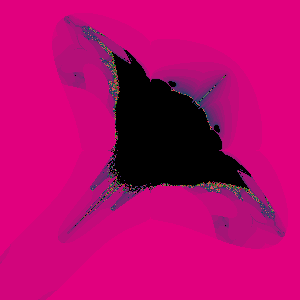
The code for this experiment can be found here.
This post is inspired by the very nice blog post A Ray Tracer in C#3.0.
The Escape time algorithm is very simple, but depending on its input it can generate very complex images.
Although not mandatory, the first thing to create is a class from complex numbers. The complex number class contains the following members:
public class Complex
{
   public Complex(double real, double img)
   public Complex Multiply(Complex c)
   public Complex Add(Complex c)
   public double Norm()
   public double NormSquared()
   public static Complex operator *(Complex c1,Complex c2)
   public static Complex operator +(Complex c1, Complex c2)
   public double Real
   public double Img
 }
Now we need something to convert from the image coordinate system to the real coordinate system. To do this the following function was created:
public static Func<double, double> InterpFunc(double x1,double y1,double x2,double y2)
{
   double m = (y2 - y1) / (x2 - x1);
   double b = y1 - (m * x1);
   return (x => m * x + b);
}
The
InterpFunc method creates a function that maps values from one coordinate system to the other.The code that creates the image is the following:
void CreateFractal(double minX, double minY,double maxX, double maxY,int imageWidth, int imageHeight)
{
   Func<double, double> xF = MathUtils.InterpFunc(0, minX, imageWidth, maxX);
   Func<double, double> yF = MathUtils.InterpFunc(0, minY, imageHeight, maxY);

   foreach (var p in from yi in Enumerable.Range(0, imageHeight)
                     from xi in Enumerable.Range(0, imageWidth)
                     select new
                       {
                          x = xi,
                          y = yi,
                          xD = xF(xi),
                          yD = yF(yi)
                       })
   {

      Complex p0 = new Complex(p.xD, p.yD);
      Func<Complex, Complex> function = functionConstructor(p0);

      int i = ApplyFunction(function, p0)
              .TakeWhile(
                (x, j) => j < maxIteration && x.NormSquared() < 4.0)
              .Count();

      HandlePixel(p.x, p.y, i);
   }

}
Basically
select expression generates the coordinates for all the points in the image . The functionConstructor function is used to create the function that will be applied to generate the fractal. One example of this functions is the one used for the Mandelbrot fractal f(x) = x^2 + p0 . The escape time is calculated by counting the number of elements in the generated sequence of function applications before the value escaped.The
ApplyFunction method is interesting since is the one that creates the sequence of recursive function applications required for this algorithm. The method looks like this:
IEnumerable<Complex> ApplyFunction(Func<Complex, Complex> function,Complex initial)
{
   Complex last = initial;
   while (true)
   {
      last = function(last);
      yield return last;
   }
}
By running this algorithm using the Mandelbrot formula:
Func<Complex,Func<Complex,Complex>> fc =
      p0 => (c => c.Multiply(c).Add(p0));

EscapeTimeFractal p = new EscapeTimeFractal(300, 300, fc);
p.MinX = -0.03;
p.MinY = 0.68;
p.MaxX = 0.03;
p.MaxY = 0.62;

p.Run();
The generated image is the following:

By running it using the Szegedi Butterfly 1 formula:
Func<Complex,Func<Complex,Complex>> fc =
      p0 =>
        (c => (new Complex(
                  ((c.Img * c.Img) - Math.Sqrt(Math.Abs(c.Real))),
                  ((c.Real * c.Real) - Math.Sqrt(Math.Abs(c.Img)))))
               + p0);

EscapeTimeFractal p = new EscapeTimeFractal(300, 300,fc);
p.MinX = -2;
p.MinY = 2;
p.MaxX =2;
p.MaxY = -2;
p.MaxIteration = 127;
p.OutputFileName = @"c:\temp\output.bmp";

p.Run();
The generated image is the following:

The code for this experiment can be found here.
Thursday, June 21, 2007
Why AutoCAD uses Lisp as extension/scripting language
The following links provide historic information on AutoLISP:
I always wanted to know why Lisp was used as the scripting/extension language of AutoCAD. Mainly because Lisp may be perceived as a Computer Science only language.
- Why Lisp? from The Autodesk File
- The AutoLISP Wikipedia entry
- Introduction to AutoLISP
I always wanted to know why Lisp was used as the scripting/extension language of AutoCAD. Mainly because Lisp may be perceived as a Computer Science only language.
Wednesday, June 20, 2007
Calling the Boo compiler from a Boo program
In this post I'm going to show a little demo of creating a piece of a Boo program on the fly, compile it and execute it as part of the main program.
The Boo language implementation comes with two very useful and interesting libraries:
The
The little demo I worked on, is a program that shows the content of an AST tree using a Winforms TreeView control. In order create this little experiment I wanted to create a class that inherits from
Creating a class that inherits from
Here's a sample of the output.

The Boo language implementation comes with two very useful and interesting libraries:
Boo.Language.Parser.dll and Boo.Language.Compiler.dll. These libraries give the developer access to Boo's parser and compiler for use within any Boo(or .NET) program. Also the AST classes( Boo.Lang.Compiler.Ast) and visitors(Boo.Lang.Compiler.Ast.Visitors) are available to create and manipulate pieces of programs . The
ast-to-string.boo,ast-to-xml.boo,run-ast.boo and run-ast-without-compiler.boo examples included with the Boo distributions shows how to use both the AST and the compiler.The little demo I worked on, is a program that shows the content of an AST tree using a Winforms TreeView control. In order create this little experiment I wanted to create a class that inherits from
Boo.Lang.Compiler.Ast.DepthFirstVisitor that will create the TreeNode instances used to visualize the tree. Creating a class that inherits from
Boo.Lang.Compiler.Ast.DepthFirstVisitor is a tedious work since you have to create a method for each kind of AST node with the same body. Because of this the Ast classes and the compiler to create the class and compile it on the fly. Here's the code.
import System
import System.Reflection
import System.IO
import Boo.Lang.Compiler
import Boo.Lang.Compiler.Ast
import Boo.Lang.Parser
import System.Windows.Forms from System.Windows.Forms


// Get the type instance for DepthFirstVisitor
a = Assembly.Load("Boo.Lang.Compiler")
t = a.GetType("Boo.Lang.Compiler.Ast.DepthFirstVisitor")

// Create a class definition for a custom visitor
myVisitor = ClassDefinition(Name:"DynamicVisitor")
myVisitor.BaseTypes.Add(SimpleTypeReference("Boo.Lang.Compiler.Ast.DepthFirstVisitor"))

// Add a new field for our node stack
myVisitor.Members.Add(Field(Name:"stck",
                            Type:SimpleTypeReference("System.Collections.Stack"),
                            Modifiers:TypeMemberModifiers.Public))

// Create all 'Enter' methods
for m as MethodInfo in [m for m in t.GetMethods() if m.Name.StartsWith("Enter")]:
   nm = Method(Name: m.Name,  Modifiers: TypeMemberModifiers.Override,
               Body:Block(),ReturnType:SimpleTypeReference("System.Boolean"))
   nm.Parameters.Add(ParameterDeclaration(Name:"p",
                                         Type:SimpleTypeReference(
                                            Name:m.GetParameters()[0].ParameterType.FullName)))

   // Node for TreeNode('')
   tnCreation = MethodInvocationExpression(ReferenceExpression("TreeNode"))
   tnCreation.Arguments.Add(
            StringLiteralExpression(m.GetParameters()[0].ParameterType.Name))

   // Create node for 't = TreeNode('')'
   decl = DeclarationStatement(
           Declaration: Declaration(Name:"t",
                      Type: SimpleTypeReference("System.Windows.Forms.TreeNode")),
           Initializer: tnCreation)

   nm.Body.Add(decl)

   // Create nodes for '(stck.Peek() as TreeNode).Nodes.Add(t)'
   at =  MethodInvocationExpression(
           MemberReferenceExpression(
              Target:MemberReferenceExpression(
                 Target: TryCastExpression(
                          Target:MethodInvocationExpression(
                                MemberReferenceExpression(
                                     Target:ReferenceExpression("stck"),
                                     Name:"Peek")),
                          Type:SimpleTypeReference("System.Windows.Forms.TreeNode")),
                 Name:"Nodes"),
              Name:"Add"))
   at.Arguments.Add(ReferenceExpression("t"))

   nm.Body.Add(ExpressionStatement(at))

   // Create node for 'stck.Push(t)'
   mie = ExpressionStatement(
              MethodInvocationExpression(
                         MemberReferenceExpression(
                               Target:ReferenceExpression("stck"),Name:"Push")))

   (mie.Expression as MethodInvocationExpression).Arguments.Add(ReferenceExpression("t"))

   nm.Body.Add(mie)

   // Add 'return true' statement
   nm.Body.Add(ReturnStatement(Expression:BoolLiteralExpression(Value:true)))

   myVisitor.Members.Add(nm)


// Create all 'Leave' methods
for m as MethodInfo in [m for m in t.GetMethods() if m.Name.StartsWith("Leave")]:
   // Create 'stck.Pop()' node
   mie = ExpressionStatement(
              MethodInvocationExpression(
                         MemberReferenceExpression(
                               Target:ReferenceExpression("stck"),Name:"Pop")))
   // CreateNode
   nm = Method(Name: m.Name,  Modifiers: TypeMemberModifiers.Override,
              Body:Block())
   nm.Body.Add(mie)
   nm.Parameters.Add(ParameterDeclaration(Name:"p",
                                          Type:SimpleTypeReference(
                                             Name:m.GetParameters()[0].ParameterType.FullName)))

   myVisitor.Members.Add(nm)

// Compile unit and module creation
cu = CompileUnit()
mod = Boo.Lang.Compiler.Ast.Module(Name:"Module")
cu.Modules.Add(mod)
mod.Imports.Add(Import(Namespace:"System.Windows.Forms"))
mod.Members.Add(myVisitor)

// Initialize compiler preferences
pipeline = Pipelines.CompileToMemory()
ctxt = CompilerContext(cu)

// Run the compiler
pipeline.Run(ctxt)

// Check the results
if (ctxt.GeneratedAssembly != null):
   // Create an instance of the new visitor and initialize it
   i as object = ctxt.GeneratedAssembly.CreateInstance("DynamicVisitor");
   t = ctxt.GeneratedAssembly.GetType("DynamicVisitor")
   tStack = System.Collections.Stack()
   tStack.Push(System.Windows.Forms.TreeNode("root"))
   t.GetField("stck").SetValue(i,tStack );
   v as DepthFirstVisitor = i

   // Parse a file an run the visitor
   //tast = BooParser.ParseString("myUnit","x = w.foo(1)")
   tast = BooParser.ParseFile(argv[0])
   tast.Accept(i)

   //Initialize a form an show the results
   frm = Form(Text: "AST content",Width: 300,Height: 300)
   tv = TreeView(Dock: DockStyle.Fill)
   tv.Nodes.Add(tStack.Pop() as TreeNode)
   frm.Controls.Add(tv)
   Application.Run(frm)
else:
   for e in ctxt.Errors:
      print e
Here's a sample of the output.

Friday, June 8, 2007
Mandelbrot Set Fractal in Fortress
One of my favorite embarrassingly parallel problems is the rendering of the Mandelbrot set fractal. It is a simple program that produces very interesting images.
There are many ways to optimize this program, however I'm going to avoid these optimizations and try to create a naive implementation of the problem, just to see to the program looks like in Fortress. Also I'm going to try to take advantage of the parallel for loops that Fortress provides.
The first thing to define is something to represent complex numbers (remember this is a non-optimize version of the problem) . It seems that in the current reference implementation of there's no native support complex number (that I could find). So this gave me the opportunity to implement it.
Note that this implementation is not complete, only the required elements for the Mandelbrot set are implemented. It is interesting that multiplication in Fortress doesn't use the '*' operation but it uses juxtaposition of elements to be multiplied. That is, instead of saying (x*y) you say (x y).
Then we need something that helps us to convert from screen coordinates to real coordinates. To do this I created the following function:
Note that this function returns another function that preforms the conversion.
Now the following code shows the implementation of the Mandelbrot set algorithm for one row in the image.
Note that I use a parallel for loop for the external for statement in order to say that each point can be calculated independently in a separate thread.
This code looks very nice when formated with Fortify:

Finally the following code show the main program. For the graphic generation, a PPM file was used since is the easiest image format to generate!.
Since the reference implementation focus is not performance, I think is not fair to publish benchmarks or something like that. However I noticed that by playing around with the
There are many ways to optimize this program, however I'm going to avoid these optimizations and try to create a naive implementation of the problem, just to see to the program looks like in Fortress. Also I'm going to try to take advantage of the parallel for loops that Fortress provides.
The first thing to define is something to represent complex numbers (remember this is a non-optimize version of the problem) . It seems that in the current reference implementation of there's no native support complex number (that I could find). So this gave me the opportunity to implement it.
value object Complex( real:RR64, img:RR64)
   opr+(self,other:Complex) = Complex(real+other.real,img+other.img)
   opr juxtaposition(self,other:Complex) =
          Complex((real other.real) - (img other.img),
                  (real other.img) + (other.real img))
   toString() = ("Complex(" real ", " img ")")
end

opr |x:Complex| = SQRT(x.real^2 + x.img^2)


complexExp (o : Complex,n : Integral) = do
   if (n = 1)
      then o
      else (o complexExp(o,n - 1))
   end
end

opr^(o:Complex,n:Integral) =
   if (n = 2)
     then (o o)
     else complexExp(o,n)
   end
Note that this implementation is not complete, only the required elements for the Mandelbrot set are implemented. It is interesting that multiplication in Fortress doesn't use the '*' operation but it uses juxtaposition of elements to be multiplied. That is, instead of saying (x*y) you say (x y).
Then we need something that helps us to convert from screen coordinates to real coordinates. To do this I created the following function:
lFunc(x1 : RR64,y1 : RR64, x2 : RR64, y2 :RR64) = do
   m = (y2 - y1) / (x2 - x1)
   b = y1 - (m x1)
   fn(x) => (m x) + b
end
Note that this function returns another function that preforms the conversion.
Now the following code shows the implementation of the Mandelbrot set algorithm for one row in the image.
lineMandelbrot[\W\](startIndex : ZZ32, endIndex : ZZ32,
                    lineData :Array[\ZZ32,ZZ32\],
                    f :RR64 -> RR64, y : RR64) = do

   for i <- startIndex:endIndex do
      p0 = Complex( f(i) , y)
      p : Complex := p0
      j : ZZ32 := 0
      maxIteration = 255
      while ( |p| < 2.0  AND j < maxIteration ) do
         p := p^2 + p0
         j := j+1
      end
      lineData[i] := j
   end
end
Note that I use a parallel for loop for the external for statement in order to say that each point can be calculated independently in a separate thread.
This code looks very nice when formated with Fortify:

Finally the following code show the main program. For the graphic generation, a PPM file was used since is the easiest image format to generate!.
run(a:String...) =
  do
     imageWidth = 100
     imageHeight = 100
     startY = -1.0
     endY = 1.0
     startX = -1.0
     endX = 1.0

     image =  array[\ZZ32\](imageWidth)

     fout: BufferedWriter = outFileOpen "output.ppm"
     outFileWrite(fout,"P3\n")
     outFileWrite(fout,"" imageWidth " " imageHeight "\n")
     outFileWrite(fout,"255\n")


     startIY = 1
     endIY = imageHeight

     fY = lFunc(startIY,startY,endIY,endY)
     fX = lFunc(0,startX,imageWidth - 1,endX)

     for iY <- seq(startIY#endIY) do
         print "Line: " iY "\n"
         lineMandelbrot(0,imageWidth - 1,image,fX,fY(iY))

         for i <- seq(0#imageWidth) do
            outFileWrite (fout,"0 0 " image[i]  "   ")
         end
         outFileWrite(fout,"\n")
     end
     outFileClose(fout)
     ()
end
Since the reference implementation focus is not performance, I think is not fair to publish benchmarks or something like that. However I noticed that by playing around with the
NumFortressThreads environment variable (found by looking at the source code) I got different execution times in my dual core machine .
Sunday, June 3, 2007
Parallel For Loops in Fortress
On interesting and promising feature of Fortress is that
It seems that the reference implementation already supports this feature. For example when running this code:
The output shows:
According to the specification the generator section of the
The output is:
for loops are parallel by default. This is documented in the 2.8 For Loops Are Parallel by Default section of the Fortress Language Specification document.It seems that the reference implementation already supports this feature. For example when running this code:
component ForLoops

export Executable

run(args:String...):() = do
   for i <- 1:10 do
      print("Iteration " i ""\n")
   end
end

end
The output shows:
Parsing /home/ldfallas/blog/fortress/for/forloopexperiment.fss with the Rats! parser: 283 milliseconds
Read /home/ldfallas/fortress/FortressLibrary.tfs: 566 milliseconds
Iteration 10
Iteration 9
Iteration 6
Iteration 4
Iteration 8
Iteration 7
Iteration 2
Iteration 5
Iteration 1
Iteration 3
finish runProgram
1711 milliseconds
According to the specification the generator section of the
for loop controls this behavior (section 13.15 and 13.14) . If the sequencial generator is used, the loop is executed in the classic order. For example:
component ForLoops

export Executable

run(args:String...):() = do
   for i <- sequential(1:10) do
      print("Iteration " i ""\n")
   end
end

end
The output is:
Parsing /home/ldfallas/blog/fortress/for/forloopexperimentSeq.fss with the Rats! parser: 282 milliseconds
Read /home/ldfallas/fortress/FortressLibrary.tfs: 546 milliseconds
Iteration 1
Iteration 2
Iteration 3
Iteration 4
Iteration 5
Iteration 6
Iteration 7
Iteration 8
Iteration 9
Iteration 10
finish runProgram
1523 milliseconds
Subscribe to:
Posts (Atom)