Monday, January 31, 2011

IronPython & Silverlight Part VI: Using the TreeView control

In this post I'm going to show a small example of using the Silverlight 4 TreeView control with IronPython.

Referencing System.Windows.Controls.dll


Before we start using the TreeView control we need to add a reference to System.Windows.Controls.dll . This assembly can be found in the "Microsoft Silverlight 4 Tools for Visual Studio 2010" package.

You need to copy this assembly to the location of chiron.exe (ex. IronPython2.7\Silverlight\bin) and add a reference to it in the AppManifest.xaml file.

<Deployment xmlns="http://schemas.microsoft.com/client/2007/deployment" 
xmlns:x="http://schemas.microsoft.com/winfx/2006/xaml"
RuntimeVersion="4.0.50917.0"
EntryPointAssembly="Microsoft.Scripting.Silverlight"
EntryPointType="Microsoft.Scripting.Silverlight.DynamicApplication"
ExternalCallersFromCrossDomain="ScriptableOnly">
<!-- Add assembly references here -->
<Deployment.Parts>
...
<AssemblyPart Source="System.Windows.Controls.dll" />
</Deployment.Parts>
...
</Deployment>


Since we're using Silverlight 4 we need to change the runtime version to "4.0.50917.0" (see this post for more details).

Using the TreeView in XAML


Now that we have access to the assembly we can use it in app.xaml.

<UserControl x:Class="System.Windows.Controls.UserControl"
xmlns="http://schemas.microsoft.com/client/2007"
xmlns:x="http://schemas.microsoft.com/winfx/2006/xaml"
xmlns:sdk="clr-namespace:System.Windows.Controls;assembly=System.Windows.Controls"
xmlns:wsdk="clr-namespace:System.Windows;assembly=System.Windows.Controls">
<StackPanel x:Name="layout_root" Background="White">
<TextBlock x:Name="Message" FontSize="30" Text="TreeView experiment" />
<sdk:TreeView x:Name="tree">
<sdk:TreeView.ItemTemplate>
<wsdk:HierarchicalDataTemplate ItemsSource="{Binding nodes}">
<TextBlock Foreground="Red" Text="{Binding label}" />
</wsdk:HierarchicalDataTemplate>
</sdk:TreeView.ItemTemplate>
</sdk:TreeView>
</StackPanel>
</UserControl>


TreeView data binding


The XAML file above shows that we're binding the content of the tree view to the nodes property of the data source object. Here's the definition of the Python class used for this example:

from System.Windows import Application
from System.Windows.Controls import UserControl
from System import Object
from System.Collections.ObjectModel import ObservableCollection
import clrtype
import clr

clr.AddReferenceToFile('GalaSoft.MvvmLight.SL4.dll')

from GalaSoft.MvvmLight.Command import RelayCommand


class Node:
__metaclass__ = clrtype.ClrClass
__clrnamespace = "LangexplrExperiments"


def __init__(self,label,children):
self.text = label
self.children = children

@property
@clrtype.accepts()
@clrtype.returns(str)
def label(self):
return self.text

@property
@clrtype.accepts()
@clrtype.returns(Object)
def nodes(self):
return self.children


class App:
def __init__(self):
root = Application.Current.LoadRootVisual(UserControl(), "app.xaml")
root.tree.ItemsSource = [Node('level1',
[Node('level11',[]),
Node('level12',[Node('level121',[])])
])]


App()


With this changes we can run chiron.exe /b and we get:

Saturday, January 29, 2011

IronPython & Silverlight Part V: Using the MVVM Light Toolkit

In this post I'm going to show a small example of using the MVVM Light Toolkit in Silverlight with IronPython.

MVVM Light


According to its website, MVVM Light Toolkit is a:

...set of components helping people to get started in the Model - View - ViewModel pattern in Silverlight and WPF...

It provides useful elements such an implementation of "Relay Command" and a feature to expose events as commands (EventToCommand).

In the context of IronPython it will save us a lot of code.

Adding a reference to MVVM Light


There are several ways to add a reference to the MVVM Light Toolkit assembly. However the first step is to set the Silverlight version to 4 (see this post for more information).

Adding the reference using the manifest


One way to add the reference is to use the manifest AppManifest.xaml. Once we generated this file(using chiron.exe /m and copying it to app/) and changed the Silverlight version to 4 (see here) we can add an entry referencing the GalaSoft.MvvmLight.SL4.dll assembly.

<Deployment xmlns="http://schemas.microsoft.com/client/2007/deployment" 
xmlns:x="http://schemas.microsoft.com/winfx/2006/xaml"
RuntimeVersion="4.0.50401.0"
EntryPointAssembly="Microsoft.Scripting.Silverlight"
EntryPointType="Microsoft.Scripting.Silverlight.DynamicApplication"
ExternalCallersFromCrossDomain="ScriptableOnly">
<!-- Add assembly references here -->
<Deployment.Parts>
...
<AssemblyPart Source="GalaSoft.MvvmLight.SL4.dll"/>
...
</Deployment.Parts>
...
</Deployment>

Also we need to copy of the GalaSoft.MvvmLight.SL4.dll file to the chiron.exe folder (ex. IronPython\Silvelright\bin).


Using it in Python


Once we referenced this file using the manifest we need to reference it from code.
import clr
clr.AddReferenceToFile('GalaSoft.MvvmLight.SL4.dll')


Example


The following example shows the use of RelayCommand and ViewModelBase from IronPython.

app.xaml:

<UserControl x:Class="System.Windows.Controls.UserControl"
xmlns="http://schemas.microsoft.com/client/2007"
xmlns:x="http://schemas.microsoft.com/winfx/2006/xaml"
xmlns:wbc="clr-namespace:System.Windows.Controls">
<StackPanel Width="300" x:Name="layout_root" Background="White">
<TextBox x:Name="my_text_box"
Text="{Binding text_to_display, Mode=TwoWay}" />

<TextBlock Text="{Binding text_to_display}" />
<Button Content="Reset" Command="{Binding reset_command}"/>
</StackPanel>
</UserControl>


app.py:

import clr
clr.AddReferenceToFile('GalaSoft.MvvmLight.SL4.dll')
from System.Windows import Application
from System.Windows.Controls import UserControl
import System
import clrtype
from System.Windows import MessageBox
from GalaSoft.MvvmLight.Command import RelayCommand
from GalaSoft.MvvmLight import ViewModelBase

class MyBasicModel(ViewModelBase):
__metaclass__ = clrtype.ClrClass

def __init__(self):
self.text = 'Initial text'

@property
@clrtype.accepts()
@clrtype.returns(System.String)
def text_to_display(self): return self.text


@text_to_display.setter
@clrtype.accepts(System.String)
@clrtype.returns()
def text_to_display(self, value):
self.text = value
self.RaisePropertyChanged('text_to_display')

@property
@clrtype.accepts()
@clrtype.returns(System.Object)
def reset_command(self):
return RelayCommand(lambda: self.perform_reset_text() )

def perform_reset_text(self):
self.text_to_display = ''


class App:

def __init__(self):

self.model = MyBasicModel()
self.root = Application.Current.LoadRootVisual(UserControl(), "app.xaml")
self.root.DataContext = self.model


theApp = App()


Using this library from IronPython saves us from many thins such as having to declare events to comply with the INotifyPropertyChanged interface.

Tuesday, January 25, 2011

IronPython & Silverlight Part IV: Using Silverlight 4

The default Silverlight runtime version of programs created with IronPython 2.7 Beta 1 is "2.0.31005.0". If you want to take advantage of Silverlight 4 features you have to make a small change to AppManifest.xaml.


For example, say that you want to add a RichTextBox control(available on Silverlight 4).

<UserControl x:Class="System.Windows.Controls.UserControl"
xmlns="http://schemas.microsoft.com/client/2007"
xmlns:x="http://schemas.microsoft.com/winfx/2006/xaml"
xmlns:wbc="clr-namespace:System.Windows.Controls">
<StackPanel Width="300" x:Name="layout_root" Background="White">
<wbc:RichTextBox x:Name="rtb" />
<Button x:Name="my_button" Content="Ok"/>
</StackPanel>
</UserControl>


And

from System.Windows import Application
from System.Windows.Controls import UserControl
import System


class App:

def __init__(self):
self.theText = """
this
is
some
text"""


self.root = Application.Current.LoadRootVisual(UserControl(), "app.xaml")
self.root.rtb.Selection.Select(self.root.rtb.ContentStart, self.root.rtb.ContentEnd)
self.root.rtb.Selection.Text = self.theText

theApp = App()


In order to make this program work you have to add the AppManifest.xaml to the app/ folder of your application. You can get a copy of this file using chiron.exe /m :

By default this file looks like this:

<Deployment xmlns="http://schemas.microsoft.com/client/2007/deployment" 
xmlns:x="http://schemas.microsoft.com/winfx/2006/xaml"
RuntimeVersion="2.0.31005.0"
EntryPointAssembly="Microsoft.Scripting.Silverlight"
EntryPointType="Microsoft.Scripting.Silverlight.DynamicApplication"
ExternalCallersFromCrossDomain="ScriptableOnly">
<!-- Add assembly references here -->
<Deployment.Parts>
<!-- In the XAP -->
<!-- <AssemblyPart Source="Foo.dll" /> -->
<!-- Outside the XAP, same domain -->
<!-- <AssemblyPart Source="/Foo.dll" /> -->
<!-- Outside the XAP, different domain -->
<!-- <AssemblyPart Source="http://bar.com/Foo.dll" /> -->
<AssemblyPart Source="Microsoft.Scripting.Silverlight.dll" />
<AssemblyPart Source="System.Numerics.dll" />
<AssemblyPart Source="Microsoft.Scripting.dll" />
<AssemblyPart Source="Microsoft.Dynamic.dll" />
<AssemblyPart Source="IronPython.dll" />
<AssemblyPart Source="IronPython.Modules.dll" />
</Deployment.Parts>
<!-- Add transparent platform extensions (.slvx) references here -->
<Deployment.ExternalParts>
<!-- Example -->
<!-- <ExtensionPart Source="http://bar.com/v1/Foo.slvx" /> -->
</Deployment.ExternalParts>
...
</Deployment>


After copying this file to the app/ folder you have to change the RuntimeVersion attribute value to "4.0.50401.0".

Now to can run the application and have access to Silverlight 4 features.

Wednesday, December 15, 2010

IronPython & Silverlight Part III: Basic Data Binding

One of the nicest features of Silverlight is data binding. This feature allows you to perform and receive changes on the UI without explicitly adding or removing elements from UI controls. For example:

<TextBox Text="{Binding TextToDisplay}">


This XAML code says that the value of the Text property is bound to the TextToDisplay property of the of the object specified by the DataContext property.

As with other Silverlight features data binding requires you to use a .NET object with properties. We can use clrtype to take advantage of this feature with IronPython.

For example, say that we want to bind a text property to a Python object to a TextBox:

<UserControl x:Class="System.Windows.Controls.UserControl"
xmlns="http://schemas.microsoft.com/client/2007"
xmlns:x="http://schemas.microsoft.com/winfx/2006/xaml">
<StackPanel Width="300" x:Name="layout_root" Background="White">
<TextBox x:Name="my_text_box"
Text="{Binding text_to_display, Mode=TwoWay}" />
<Button x:Name="my_button" Content="Show text"/>
</StackPanel>
</UserControl>


The app.py file looks like this:


from System.Windows import Application
from System.Windows.Controls import UserControl
import System
import clrtype
from System.Windows import MessageBox

class MyData:
__metaclass__ = clrtype.ClrClass

def __init__(self):
self.text = 'Initial text'

@property
@clrtype.accepts()
@clrtype.returns(System.String)
def text_to_display(self): return self.text


@text_to_display.setter
@clrtype.accepts(System.String)
@clrtype.returns()
def text_to_display(self, value):
self.text = value

class App:

def handle_click(self, sender, event_args):
MessageBox.Show(self.data.text)

def __init__(self):
self.data = MyData()
self.root = Application.Current.LoadRootVisual(UserControl(), "app.xaml")
self.root.my_text_box.DataContext = self.data
self.root.my_button.Click += lambda s,ea: self.handle_click(s,ea)

theApp = App()


Here the definition of MyData is decorated with the information on how to generate the .NET class elements to be exposed .


Since the binding is declarated as TwoWay modifications to the TextBox are reflected in the data instance.


As with Part I and Part II of these series, IronPython 2.7 beta 1 is used for all examples.

Tuesday, December 7, 2010

IronPython & Silverlight Part II: Basic event handling

There are a couple of ways to add event handlers to Silverlight controls. The common way is to add the event handlers directly in XAML. For example:

<Button x:Name="ButtonGo" Content="Go!" Click="MyClickHandler" />


Given that there's a definition for the MyClickHandler method in your C# code. However for IronPython there's a couple of options:

Directly in Python code


Event handlers can be added as in C# by using the '+=' operator. For example say that you have the following XAML code describing an UserControl:

<UserControl x:Class="System.Windows.Controls.UserControl"
xmlns="http://schemas.microsoft.com/client/2007"
xmlns:x="http://schemas.microsoft.com/winfx/2006/xaml">

<StackPanel Width="300" x:Name="layout_root" Background="White">
<TextBlock x:Name="Message" FontSize="30" />
<Button x:Name="ButtonGo" Content="Go!" />
</StackPanel>
<UserControl.Resources>
<Storyboard x:Name="MyStoryboard">
<DoubleAnimation
Storyboard.TargetName="Message"
Storyboard.TargetProperty="Opacity"
From="1.0" To="0.0" Duration="0:0:3"
AutoReverse="True"
RepeatBehavior="Forever"/>
</Storyboard>
</UserControl.Resources>
</UserControl>


Say we want to start the 'MyStoryboard' animation in the event handler for the Click event of the ButtonGo button. We can write:

from System.Windows import Application
from System.Windows.Controls import UserControl

def handle_click(sender, event_args):
theApp.root.MyStoryboard.Begin()

class App:

def __init__(self):
self.root = Application.Current.LoadRootVisual(MyUserControl(), "app.xaml")
self.root.Message.Text = "Welcome to Python and Silverlight!"
self.root.ButtonGo.Click += handle_click

theApp = App()


Using clrtype


The clrtype module can be used to define .NET classes from (Iron)Python classes . This module can be found in the IronPython samples package or here in the GitHub repository. The GUI Automated Testing blog has some nice tutorials on using clrtype.

To use this module, you have to copy the clrtype.py file to your app/ folder.

We can change the code this way:

from System.Windows import Application
from System.Windows.Controls import UserControl
from System.Windows import MessageBox
import System
import clrtype

class MyUserControl(UserControl):
__metaclass__ = clrtype.ClrClass

_clrnamespace = "MyNs"

@clrtype.accepts(System.Object, System.EventArgs)
@clrtype.returns(System.Void)
def my_click_handler(self, sender, event_args):
theApp.root.MyStoryboard.Begin()


def __getattr__(self, name):
return self.FindName(name)

def handle_click(sender,event_args):
theApp.root.MyStoryboard.Begin()

class App:

def __init__(self):
self.root = Application.Current.LoadRootVisual(MyUserControl(), "app.xaml")
self.root.Message.Text = "Welcome to Python and Silverlight!"

theApp = App()


With these definitions we can change the XAML code for the Button to have be:

<Button x:Name="ButtonGo" Content="Go!" Click="my_click_handler"/>


Notice that the definition of MyUserControl has a definition for __getattr__. This definition is used to still be able to access the definitions of child controls for example theApp.root.MyStoryboard.

Final words


Another way to do event handling is to use Commanding. This approach is preferred for MVVM. For future posts I'll try to cover the use of Commanding with IronPython.

Tuesday, November 30, 2010

Using IronPython with Silverlight, Part I

This is the first of series of posts on the topic of using IronPython to create Silverlight programs. Experimenting with these technologies is nice because you only need a text editor and the IronPython distribution.

Getting started


In these series of posts I'll be using IronPython 2.7 (which is in beta right now) and Silverlight 4 .

Once these packages are installed the first step is to copy a basic program template to a your work directory. The template is located in (IronPython path)\Silverlight\script\templates\python.

This template contains the following structure:


C:.
¦ index.html
¦
+---app
¦ app.py
¦ app.xaml
¦
+---css
¦ screen.css
¦
+---js
error.js


The app.py and app.xaml files contain the code for the entry point of the demo Silverlight application. The index.html file contains the Silverlight control host.

The default app.xaml code looks like this:

<UserControl x:Class="System.Windows.Controls.UserControl"
xmlns="http://schemas.microsoft.com/client/2007"
xmlns:x="http://schemas.microsoft.com/winfx/2006/xaml">

<Grid x:Name="layout_root" Background="White">
<TextBlock x:Name="Message" FontSize="30" />
</Grid>

</UserControl>


The default app.py code looks like this:

from System.Windows import Application
from System.Windows.Controls import UserControl

class App:
def __init__(self):
root = Application.Current.LoadRootVisual(UserControl(), "app.xaml")
root.Message.Text = "Welcome to Python and Silverlight!"

App()


As you can see this code loads the XAML file for defining the 'root visual' . The 'root.Message.Text = ...' assignment changes the text displayed by the 'Message' TextBlock instance. Notice that it uses the name of the control as if it were a member of the UserControl instance returned by LoadRootVisual. This is accomplished by using a DLR feature defined in the FrameworkElementExtension class (see ExtensionTypes.cs )

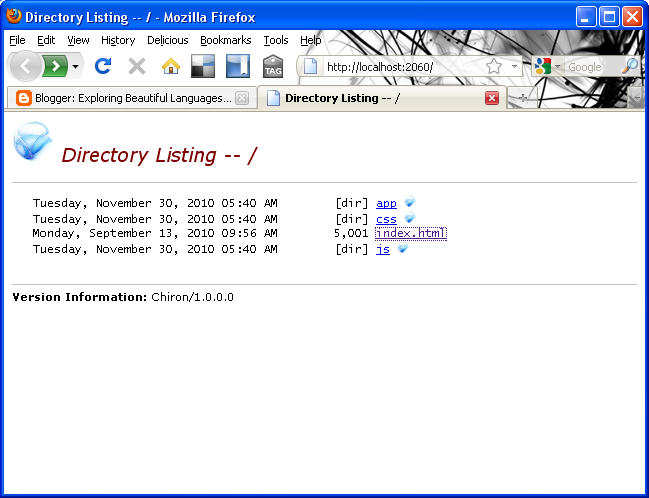
You can easily run this example by going to the command line and running Chiron:

C:\development\blog\ipy\basictest>c:\development\IronPython-2.7\Silverlight\bin\Chiron.exe /b
Chiron - Silverlight Dynamic Language Development Utility. Version 1.0.0.0
Chiron serving 'C:\development\blog\ipy\basictest' as http://localhost:2060/
21:03:45 200 1,185 /
21:03:45 200 792 /style.css!
21:03:45 200 2,492 /sl.png!
21:03:45 200 642 /slx.png!
21:03:49 404 580 /favicon.ico [Resource not found]


Running Chiron this way will start the web server and will open a web browser in its root.


(Note: For IronPython 2.7 Beta you have to copy the System.Numerics.dll assembly in the %IPY_HOME\Silverlight\bin folder, this file could be found in the Silverlight SDK distribution).

When you select the index.html file the Silverlight program is executed.


As you can see an IronPython REPL console is activated by default in this template. This console is activated by using the following tag in the HTML file.

<param name="initParams" value="reportErrors=errorLocation, console=true" />


The nice thing about this is that you can manipulate the Silverlight application while is executing. To see an example of this, we can change the definition of the App class to be like this:

class App:

def __init__(self):
self.root = Application.Current.LoadRootVisual(UserControl(), "app.xaml")
self.root.Message.Text = "Welcome to Python and Silverlight!"

theApp = App()


With this change we can now have access to the UI elements defined in XAML. For example:


For future posts I'm going to talk about specific topics on the use of Silverlight and IronPython.

A nice source of information on this topic is the following page by Michael Foord "Python in your Browser with Silverlight"

Monday, October 25, 2010

Writing Python's groupby in C#

A couple of days ago, while working on a C# program, I had the necessity of grouping contiguous elements from a sequence given a property. A group needs to be created each time the value of the property changes in a similar way to the uniq Unix utility.

Python has a function called groupby which is part of the nice itertools module which does exactly what I want. For example:


>>> strList = ["abc","ert","bre","sd","ghj","awe","ew","gh"]
>>> [list(g) for i,g in groupby(strList,lambda x: len(x))]
[['abc', 'ert', 'bre'], ['sd'], ['ghj', 'awe'], ['ew', 'gh']]
>>> numList = [1,2,2,2,1,1,1,5,5]
>>> [list(g) for i,g in groupby(numList)]
[[1], [2, 2, 2], [1, 1, 1], [5, 5]]


In .NET a class called Enumerable with lots of extension methods to manipulate with sequences (IEnumerable<T>). This class includes an extension method called GroupBy which groups values according to a key. However it behaves more like SQL's Group by in that it considers all the values of the collection. For example:

csharp> using System.Collections.Generic;
csharp> var strList = new List<string>() {"abc","ert","bre","sd","ghj","awe","ew","gh"};

csharp> strList.GroupBy(x => x.Length);
{ { "abc", "ert", "bre", "ghj", "awe" }, { "sd", "ew", "gh" } }

csharp> var numList = new List<int>() {1,2,2,2,1,1,1,5,5};

csharp> numList.GroupBy(x => x);
{ { 1, 1, 1, 1 }, { 2, 2, 2 }, { 5, 5 } }


(The C# examples will be presented using the very useful Mono C# REPL)

Writing the equivalent function in C# turned out to be a nice programming excessive. Also trying to write the function using only "yield return" turned out the more challenging than I thought!.

As a first try we can write this function using intermediate collections to store the partial groups:

using System.Collections.Generic;
using System;
namespace Langexplr.Experiments
{
public class MyTuple<T,K>
{
public T Item1 { get; set; }
public K Item2 { get; set; }


public static MyTuple<T1,K1> Create<T1,K1>(T1 first, K1 second)
{
return new MyTuple<T1,K1>() {Item1 = first, Item2 = second};
}
}
public static class GroupByTests
{
public static IEnumerable<MyTuple<K,IList<T>>> MyGroupByWithLists<T,K>(this IEnumerable<T> en,Func<T,K> keyExtraction)
{
K currentKey = default(K);
bool firstTime = true;
IList<T> currentGroup = new List<T>();
foreach(var aValue in en)
{
if (firstTime)
{
currentKey = keyExtraction(aValue);
firstTime = false;
}
else
{
K tmpKey = keyExtraction(aValue);
if (!tmpKey.Equals(currentKey))
{
yield return MyTuple<K,IList<T>>.Create(currentKey, currentGroup);
currentGroup = new List<T>();
currentKey = tmpKey;
}

}
currentGroup.Add(aValue);
}
if (currentGroup.Count > 0)
{
yield return MyTuple<K,IList<T>>.Create(currentKey, currentGroup);
}
}

}
}

Here I'm defining a class called MyTuple which is very similar to .NET 4' Tuple class to store group's key and members.

This function works as expected, for example:

csharp> strList.MyGroupByWithLists(x => x.Length).Select(x => x.Item2).ToList();
{ { "abc", "ert", "bre" }, { "sd" }, { "ghj", "awe" }, { "ew", "gh" } }
csharp> numList.MyGroupByWithLists(x => x).Select(x => x.Item2).ToList();
{ { 1 }, { 2, 2, 2 }, { 1, 1, 1 }, { 5, 5 } }


One of the interesting things about the Python version of groupby is that it doesn't create an intermediate collections for each group. The itertools module reference has the code for the groupby implementation.

Trying to write a this function with similar characteristics in C# resulted in the following (scary) code:


public static IEnumerable<MyTuple<K,IEnumerable<T>>> MyGroupBy<T,K>(this IEnumerable<T> en,Func<T,K> keyExtraction)
{
K currentGroupKey = default(K);
bool firstTime = true;
bool hasMoreElements = false;
bool yieldNewValue = false;

IEnumerator<T> enumerator = en.GetEnumerator();
hasMoreElements = enumerator.MoveNext();
while (hasMoreElements)
{
if (firstTime)
{
firstTime = false;
yieldNewValue = true;
currentGroupKey = keyExtraction(enumerator.Current);
}
else
{
K lastKey;
while((lastKey = keyExtraction(enumerator.Current)).Equals( currentGroupKey) &&
(hasMoreElements = enumerator.MoveNext()))
{

}
if(hasMoreElements &&
!lastKey.Equals(currentGroupKey))
{
currentGroupKey = lastKey;
yieldNewValue = true;
}
else
{
yieldNewValue = false;
}
}

if (yieldNewValue) {
yield return MyTuple<K,IEnumerable<T>>.Create(
currentGroupKey,
ReturnSubSequence((x) => {
hasMoreElements = enumerator.MoveNext();
return hasMoreElements &&
x.Equals(keyExtraction(enumerator.Current)); },
enumerator,
currentGroupKey,
enumerator.Current));
}
}
}
static IEnumerable<T> ReturnSubSequence<T,K>(Predicate<K> pred, IEnumerator<T> seq,K currentElement,T first)
{
yield return first;
while( pred(currentElement))
{
yield return seq.Current;
}
}


Using this function we can write:


csharp> numList.MyGroupBy().Select(x => x.Item1);
{ 1, 2, 1, 5 }
csharp> numList.MyGroupBy().Select(x => x.Item2.ToList());
{ { 1 }, { 2, 2, 2 }, { 1, 1, 1 }, { 5, 5 } }
csharp> strList.MyGroupBy(s => s.Length).Select(x => x.Item1);
{ 3, 2, 3, 2 }
csharp> strList.MyGroupBy(s => s.Length).Select(x => x.Item2.ToList());
{ { "abc", "ert", "bre" }, { "sd" }, { "ghj", "awe" }, { "ew", "gh" } }


One interesting fact about this way of writing the groupby function is that, you have to be very careful handling the resulting iterator/enumerable. From Python's groupby documentation:

The returned group is itself an iterator that shares the underlying iterable with groupby(). Because the source is shared, when the groupby() object is advanced, the previous group is no longer visible


For example in Python, the following effect occurs if we consume the complete iterator before consuming each group:

>>> l = groupby(strList,lambda s: len(s))
>>> consumed = list(groupby(strList,lambda s: len(s)))
>>> [list(g) for k,g in consumed]
[[], ['gh'], [], []]


In our C# version we have a similar restriction, for example:


csharp> var consumed = strList.MyGroupBy(s => s.Length).ToList();
csharp> consumed.Select(x => x.Item2);
{ { "abc" }, { "sd" }, { "ghj" }, { "ew" } }


Code for this post can be found here.