Showing posts with label newspeak. Show all posts

Saturday, June 19, 2010

Generating XML with Newspeak

While experimenting with Newspeak I wrote a small utility class for generating basic XML documents.

An example of its use looks like this:

w:: getTestingWriter: output .
w element: 'foo'
attributes: { {'id'. 'goo'.} }
with: [
w element: 'foo1'.
w element: 'foo2'.
w element: 'foo3'
with: [
w element: 'foo4'
with: [
w text: 'Hello'.
].
w cdata: ''.
].
].


This generates:

<foo id="goo"><foo1 /><foo2 /><foo3><foo4>Hello</foo4><![CDATA[<loo>]]></foo3></foo>


The code for generating XML this way is based on a previous experiment of using Python's 'with' statement to wrap the .NET's System.Xml.XmlWriter class to generate XML.

Code for this post can be found here.

Sunday, June 13, 2010

Parsing XML documents with namespaces in Newspeak

The previous post showed a basic grammar for XML written using Newspeak parsing combinators. Although Newspeak already includes XML support, it is a great exercise to explore another interesting parts of the language.

The grammar


The grammar defined in the previous post looks like this:

class XmlGrammar = ExecutableGrammar(
"Xml 1.0 grammar with namespaces according to http://www.w3.org/TR/REC-xml/ "
|
openAB = char: $<.
closeAB = char: $>.
amp = char: $&.
semicolon = char: $; .
slash = char: $/.


topenAB = tokenFromChar: $<.
tcloseAB = tokenFromChar: $>.
tslash = tokenFromChar: $/.

comment = openAB , (char: $-),(char: $-),
((charExceptFor: $-) | ((char: $-), (charExceptFor: $-))) plus,
(char: $-),(char: $-),closeAB .

letter = (charBetween: $a and: $z) | (charBetween: $A and: $Z).
digit = charBetween: $0 and: $9.

colon = char: $:.

quote = (char:$') .
dquote = (char:$") .

eq = tokenFromChar: $= .

VersionNum = (char:$1), (char: $.) , (charBetween: $0 and: $9) plus.

VersionInfo = (tokenFromSymbol: #version), eq, ((quote, VersionNum,quote) | (dquote, VersionNum, dquote )).

EncName = letter, (letter | digit) star.

EncodingDecl = (tokenFromSymbol: #enconding) , eq , ((quote, EncName ,quote) | (dquote , EncName , dquote )).

yesNo = (tokenFromSymbol: #yes) | (tokenFromSymbol: #no).

SDDecl = (tokenFromSymbol: #standalone), eq, ((quote, yesNo ,quote) | (dquote , yesNo , dquote )).

XMLDecl = (char: $<) , (char: $?) ,(tokenFromSymbol: #xml), VersionInfo , EncodingDecl opt, SDDecl opt,
(tokenFromChar: $?), (char: $>).

dprolog = XMLDecl.

NameStartChar = letter | (char: $_) .

NameChar = NameStartChar | (char: $-) | (char: $.) | digit.

Name = NameStartChar, NameChar star.

NameWithPrefix = Name, colon, Name.

QName = NameWithPrefix | Name.

TQName = tokenFor: QName.

EntityRef = amp, Name ,semicolon .

CharRef = amp, (char: $#), (((char:$x), (digit | letter) plus) | (digit plus)) ,semicolon .

Reference = EntityRef | CharRef.

AttributeContent1 = (charExceptForCharIn: {$< . $". $&. }) | Reference.


AttributeValue = (dquote, AttributeContent1 star,dquote) |
(quote, AttributeContent1 star,quote).

Attribute = TQName ,eq, AttributeValue.

EmptyElemTag = topenAB ,QName, Attribute star, tslash , closeAB .
STag = topenAB ,QName, Attribute star, tcloseAB .
ETag = topenAB ,slash,QName, tcloseAB .

CDStart = topenAB ,(char: $!),(char:$[),(tokenFromSymbol: #CDATA),(char:$[).
CDEnd = (char: $]),(char: $]),(char: $>).

CDSect = CDStart, (charExceptFor: $]) star , CDEnd.

CharData = tokenFor: ((charExceptForCharIn: {$&. $<}) plus).

content = CharData opt, ((element | Reference | CDSect), CharData opt) star.

ComplexElement = STag, content , ETag.

element = EmptyElemTag | ComplexElement .


|
)
(
...
)


XML nodes


The next step was to add support for the creation of data structures representing the XML document. A technique presented in the Executable Grammars[PDF] paper suggest creating a subclass of the grammar which adds the code for creating the XML node tree.

class XmlParserWithXmlNodes = XmlGrammar (
"Basic XmlParser with XML node AST"
|


|)
('as yet unclassified'
Attribute = (
^ super Attribute wrapper: [:name :eq :value | {name. value.}].
)

AttributeValue = (
|flattenString|
^ super AttributeValue
wrapper: [:q1 :chars :q2 |
flattenString:: (chars collect:
[:c | (c isString)
ifTrue: [c at: 1]
ifFalse: [c]]).
String withAll:flattenString ].
)

CDSect = (
^ super CDSect wrapper: [:cs :data :ce | String withAll: data].
)

CDStart= (
^ super CDStart wrapper: [:t :e :b1 :cdata :b2 | 'cdatastart'].
)

CharData = (
^ super CharData wrapper: [:chars | String withAll: (chars token ) ].

)

CharRef = (
|numberStr|
^ super CharRef
wrapper: [:a1 :p :numberChars :sc |
|base|
numberStr:: ((numberChars at: 1) = $x)
ifTrue: [base:: 16.
String withAll: (numberChars at: 2)]
ifFalse: [base:: 10.
String withAll: numberChars].

(Unicode value: (Number readFrom: numberStr base: base)) asString
].
)

ComplexElement = (
|tn attCollection|
tn:: XmlNodes new.
attCollection:: tn Attributes new.

^ super ComplexElement
wrapper: [:s :childNodes :e |
(e asString = s name asString)
ifFalse: [error: 'Open tag different from closing tag'].
s childNodes: childNodes.
s].
)

ETag = (
^ super ETag wrapper: [:o :s :name :c | name].
)

EmptyElemTag = (

^super EmptyElemTag
wrapper: [:oab :name :atts :s :cab |
|tn attCollection|
tn:: XmlNodes new.
attCollection:: tn Attributes new.

atts do: [:att | attCollection addAttributeWithQName: ((att at: 1) token) value: (att at:2)].
tn Element name: name attributes: attCollection childNodes:{} ].
)

EntityRef = (
^ super EntityRef
wrapper: [:a :name :sc |
(entities valueForName: ((name at: 1) at: 1)) asString ].
)

Name = (
^ super Name wrapper: [:startChar :rest | { { (startChar asString), (String withAll: rest) } } ].
)

NameWithPrefix = (
|tn|
tn:: XmlNodes new.
^ super NameWithPrefix
wrapper: [ :prefix :c :name |
{{(prefix at: 1). (name at: 1).}} ].
)

QName = (
|tn|
tn:: XmlNodes new.
^ super QName wrapper: [ :data | ((data size) = 2)
ifTrue:[tn QualifiedName prefix: ((data at:1) at: 1)
localPart:((data at: 2) at:1)]
ifFalse:[tn QualifiedName prefix: nil localPart: (data at: 1)]]
)

STag = (
^super STag
wrapper: [:oab :name :atts :cab |
|tn attCollection|
tn:: XmlNodes new.
attCollection:: tn Attributes new.
"Add attributes"
atts do: [:att | attCollection addAttributeWithQName: ((att at: 1) token)
value: (att at:2)].
"Create elements"
tn Element name: name attributes: attCollection childNodes:{} ].
)

VersionInfo = (
^super VersionInfo
wrapper: [:v :e :versionTextList | versionTextList at: 2].
)

VersionNum = (
^super VersionNum
wrapper: [:one :dot :num |
Number
readFrom: (String withAll: {one.dot},(String withAll: num))].
)

XMLDecl = (
|tn|
tn:: XmlNodes new.
^super XMLDecl
wrapper: [:c1 :c2 :x :versionInfo :enc :sd :c3 :c4 |
tn TAstXmlDecl version: versionInfo
encoding: enc
standalone: sd] .
)

content = (
|result|

^ super content wrapper: [:chars :cseq |
(chars = nil)
ifTrue: [result:: {}]
ifFalse: [result:: {chars}].
cseq inject: result into: [:total :current |
result:: addCompactingStrings: (current at: 1) to: result .
(current at: 2) ifNotNil: [:c | addCompactingStrings: c to: result ].
result ].
].
)

...

)


XML Namespaces


Support for XML namespace resolution was the next step. As described in the Namespaces in XML 1.0 document, XML can have different namespaces for its elements. For example:

<docs:letter docs:xmlns="http://www.foo.com/docs"
pic:xmlns="http://www.foo.com/docs/links">
<docs:paragraph>some text1</docs:paragraph>
<pic:pictureRef location="goo/moo/loo"/>
<docs:paragraph>some text2</docs:paragraph>
</docs:letter>


In this case the 'docs:xmlns' and 'pic:xmlns' attributes associates the 'docs' and 'pics' prefixes to the specified namespaces. So the namespace of the 'letter' element is 'http://www.foo.com/docs'.

Also default namespaces could be specified, like this:

<letter xmlns="http://www.foo.com/docs">

<paragraph>some text1</paragraph>
<pictureRef location="goo/moo/loo"
xmlns="http://www.foo.com/docs/links" />
<paragraph>some text2</paragraph>
</letter>


The basic idea is that xmlns attributes define an scope where a set of prefix/namepace associations and a default namespace are valid. For each start tag a new scope with new declarations must be in context and each end tag must remove the last scope.

Extending the parsing context


In order to do add this functionality, we need to be able to keep a stack with the scopes of namespace declarations that is modified each time we enter or exit from a element declaration. Fortunately, the parser combinator library includes a ParserContext class which is used for keeping track parsing errors.

One problem to use ParserContext was that an instance of it is created inside the CombinatorialParser parse: method which is part of the parsing library. This instance is configured in certain way to process parsing errors. So in order to create add a extended context we needed to somehow replace the ParserContext class with a new implementation.

Luckly, as described in the Modules as Objects in Newspeak[PDF] paper in Newspeak you can override inner class definitions just like you override methods in any other OO language. This means that I can extend the parser library and since ParserContext is defined as an inner class, override its definition to add my own parsing context. The definition of the extended parsing library looks like this:

class ParserLibraryWithXmlContext = parserLibraryClass usingLib: platform (
"A parser library with overwritten parsing context for Xml namespace resolution"
|
parserLibContext = super ParserContext .
|
)
(

class ParserContext = parserLibContext(
"An Xml parser context that keeps track of namespaces."
|
protected prefixes = collections MutableArrayList new: 10.
|
)
('as yet unclassified'
addPrefix: prefix for: namespace = (
|lastLevel|
lastLevel:: prefixes at: (prefixes size).
lastLevel at: prefix put: namespace.

)

namespaceFor: prefix = (
|levelIndex|

levelIndex:: prefixes findLast: [:lvl | (lvl includesKey: prefix) ].
^(levelIndex > 0)
ifTrue: [(prefixes at: levelIndex) at: prefix]
ifFalse: [nil].
)

popLevel = (
prefixes pop.
)

pushLevel = (
prefixes push: (collections MutableHashedMap new).
)


))


This is pretty nice since it allowed us to inject our own implementation of ParsingContext (which extends the original!). An interesting thing to notice is the definition of the parserLibContext which is bound to the base definition of the ParserContext class which we need in order to inherit from it.

Using the extended context


Now having added the new parsing context the next step is to add the code to manipulate the context. In order to do that, we need to add a some functionality to the STag, EmptyElement and ETag productions of the grammar so we can push and pop namespace scopes for each element. In other to do this without modifying the existing functionality three wrappers were created for each of this productions:


class ParserWithNamespaceForStartTag = CombinatorialParser (
"A parser that takes care of modyfing the parsing context for a start tag"
|
innerparser
|
)
('as yet unclassified'
forParser: p = (
innerparser:: p.
)

parse: input inContext: context ifError: blk = (
|result xmlnsAttributes elementName elementNamespace attName|
result:: innerparser parse: input inContext:context ifError:blk.
"First update the context with the newest prefix declarations"
context pushLevel.
xmlnsAttributes:: result attributes allAttributesWithLocalName: 'xmlns'.
xmlnsAttributes
do: [:aPair | context addPrefix: ((aPair at: 1) prefix)
for: (aPair at: 2)].
"Update the element"
elementName:: result name.
elementNamespace:: context namespaceFor: elementName prefix.
elementName namespace: elementNamespace.

"Update the attributes"
result attributes
do: [:aPair |
attName:: aPair at: 1.
attName namespace:
(context namespaceFor: attName prefix)
].

^result.
)

class ParserWithNamespaceForStartEndTag =ParserWithNamespaceForStartTag(
"Parser that takes care of modifying the parsing context for namespace declarations for self closing tags."
|

|
)
('as yet unclassified'
parse: input inContext: context ifError: blk = (
|result|
result:: super parse: input inContext: context ifError: blk.
context popLevel.
^result
)

)

class ParserWithNamespaceForEndTag = CombinatorialParser (
"A parser that takes care of modyfing the parsing context for a end tag"
|
protected innerParser = nil.

|
)
('as yet unclassified'
forParser: parser = (
innerParser:: parser.
)

parse: input inContext: context ifError: blk = (
|result|
result:: innerParser parse: input inContext: context ifError: blk.
context popLevel.
^result
)


As shown here the start tag parser pushes a new scope with the new namespace declarations, while the end tag parser pops a scope.

Now to add this wrappers I created a new subclass of the parser with nodes to add this functionality.

class XmlParserWithNodesAndNamespaces = XmlParserWithXmlNodes (
"An XML Parser that creates a node tree and that resolves the namespaces."
|

|
)
('as yet unclassified'
ETag = (
|newWrappingParser|
newWrappingParser:: ParserWithNamespaceForEndTag new.
newWrappingParser forParser: (super ETag).
^newWrappingParser
)

EmptyElemTag = (
|newWrappingParser|
newWrappingParser:: ParserWithNamespaceForStartEndTag new.
newWrappingParser forParser: (super EmptyElemTag).
^newWrappingParser
)

STag = (
|tn attCollection newWrappingParser|
newWrappingParser:: ParserWithNamespaceForStartTag new.
newWrappingParser forParser: (super STag).
^newWrappingParser
)

)


Code organization


The code for this experiment is organized as follows:

class  XmlTools withParserLibClass: parserLibraryClass usingLib: platform = 
(
...
) (
class XmlParsing withParsingLib: parserLibrary = (
...
)
(
class XmlGrammar = ExecutableGrammar
( ...) ( ... )
class XmlParserWithXmlNodes = XmlGrammar
( ... ) ( ... )
class XmlParserWithNodesAndNamespaces = XmlParserWithXmlNodes
( ... ) ( ... )
...
)

basicParser = (
|parsingLib xmlparsing|
parsingLib:: parserLibraryClass usingLib: platform.
xmlparsing:: XmlParsing withParsingLib: parsingLib.
^xmlparsing XmlParserWithXmlNodes new.
)

parserWithNamespaceSupport = (
|parsingLib xmlparsing|
parsingLib:: ParserLibraryWithXmlContext new.
xmlparsing:: XmlParsing withParsingLib: parsingLib.
^xmlparsing XmlParserWithNodesAndNamespaces new.
)
...
)


Here the XmlTools class definition will represent a module for XML utilities. Its inner definitions include the XmlParsing inner class which defines the grammar along other parsing utilities. The basicParser parserWithNamespaceSupport show an example of how the parser is created.

The following methods show how the XmlTools class is used to create a concrete parser for a basic XML document:

getTestingNsParser = (
|platform|
platform:: Platform new.
^(XmlTools
withParserLibClass: BlocklessCombinatorialParsing
usingLib: platform) parserWithNamespaceSupport.
)

testElementWithOneChildWithNamespaces = (
|parser r ctxt|
parser:: xmlNsParserWrapper: (getTestingNsParser element) .
r:: parser parse: (streamFromString: '') .

assert:[r childNodes size = 1].
assert:[r name asString = 'myElement'].
assert:[r name namespace = 'http://foo'].
assert:[((r childNodes at: 1) name asString) = 'childElement1'].
assert:[((r childNodes at: 1) name namespace) = 'http://foo'].
)


Final words


The nicest think to notice is that the original class containing the grammar for XML was not modified in order to introduce this feature. In fact the parser with XML nodes without namespaces is also available . Also I really liked the way the ParserContext class was replaced which automatically allowed me to add this new functionality.

Code for this post can be found here.

Monday, May 24, 2010

A simple XML Grammar in Newspeak

Recently I've been doing some experiments for parsing XML in using Newspeak parser combinators.

Here's the grammar:


class XmlGrammar = ExecutableGrammar(
"Xml 1.0 grammar with namespaces"
|
openAB = char: $<.
closeAB = char: $>.
amp = char: $&.
semicolon = char: $; .
slash = char: $/.


topenAB = tokenFromChar: $<.
tcloseAB = tokenFromChar: $>.
tslash = tokenFromChar: $/.

comment = openAB , (char: $-),(char: $-),
((charExceptFor: $-) | ((char: $-), (charExceptFor: $-))) plus,
(char: $-),(char: $-),closeAB .

letter = (charBetween: $a and: $z) | (charBetween: $A and: $Z).
digit = charBetween: $0 and: $9.

colon = char: $:.

quote = (char:$') .
dquote = (char:$") .

eq = tokenFromChar: $= .

VersionNum = (char:$1), (char: $.) , (charBetween: $0 and: $9) plus.

VersionInfo = (tokenFromSymbol: #version), eq, ((quote, VersionNum,quote) | (dquote, VersionNum, dquote )).

EncName = letter, (letter | digit) star.

EncodingDecl = (tokenFromSymbol: #enconding) , eq , ((quote, EncName ,quote) | (dquote , EncName , dquote )).

yesNo = (tokenFromSymbol: #yes) | (tokenFromSymbol: #no).

SDDecl = (tokenFromSymbol: #standalone), eq, ((quote, yesNo ,quote) | (dquote , yesNo , dquote )).

XMLDecl = (char: $<) , (char: $?) ,(tokenFromSymbol: #xml), VersionInfo , EncodingDecl opt, SDDecl opt,
(tokenFromChar: $?), (char: $>).

dprolog = XMLDecl.

NameStartChar = letter | (char: $_) .

NameChar = NameStartChar | (char: $-) | (char: $.) | digit.

Name = NameStartChar, NameChar star.

QName = (Name, colon, Name)| Name.

TQName = tokenFor: QName.

EntityRef = amp, Name ,semicolon .

CharRef = amp, (char: $#), (((char:$x), (digit | letter) plus) | (digit plus)) ,semicolon .

Reference = EntityRef | CharRef.

AttributeContent1 = (charExceptForCharIn: {$< . $". $&. }) | Reference.


AttributeValue = (dquote, AttributeContent1 star,dquote) |
(quote, AttributeContent1 star,quote).

Attribute = TQName ,eq, AttributeValue.

EmptyElemTag = topenAB ,QName, Attribute star, tslash , closeAB .
STag = topenAB ,QName, Attribute star, tcloseAB .
ETag = topenAB ,slash,QName, closeAB .

CDStart = topenAB ,(char: $!),(char:$[),(tokenFromSymbol: #CDATA),(char:$[).
CDEnd = (char: $]),(char: $]),(char: $>).

CDSect = CDStart, (charExceptFor: $]) star , CDEnd.

CharData = tokenFor: ((charExceptForCharIn: {$&. $<}) plus).

content = CharData opt, ((element | Reference | CDSect), CharData opt) star.

ComplexElement = STag, content , ETag.

element = EmptyElemTag | ComplexElement .


|
)
...


Code for this experiment can be found here.

Monday, November 23, 2009

Adding automatic semicolon insertion to a Javascript parser

A couple of weeks ago I wrote a blog post about a Javascript parser written using the Newspeak parsing combinators. As mentioned in that post, no semicolon insertion was supported. This post shows how the feature was added.

Automatic semicolon insertion


As detailed in section 7.9 of the ECMA 262 document[PDF], in Javascript you can use newline as statement separator in some scenarios. For example a semicolon is "implicitly inserted" if expression-statements are separated by line terminators:


if (condition) {
print("A")
print("B")
}


This code snippet is equivalent to:


if (condition) {
print("A");
print("B");
}


Solution


In the a original post about the parser, espin pointed me out to a paper[PDF] by A. Warth that mentions how the semicolon insertion problem was solved in a Javascript parser written in OMeta. The solution presented is this post is based on the one from the paper.


I wanted to isolate the code that performs this function. So in order to add this functionality I created a subclass that overrides the productions that get involved in this process. This way we can have both a parser with and without the feature. Here's the code:


class JSGrammarWithSemicolonInsertion = JSGrammar (
"Parser features that add automatic semicolon insertion"
|

specialStatementTermination = ((( cr | lf ) not & whitespace ) star,
(semicolon | comment | lf | cr | (peek: $})) )
wrapper: [ :ws :terminator | | t | t:: Token new. t token: $;. t].

returnStatement = return, (specialStatementTermination |
(expression , specialStatementTermination)).

breakStatement = break, (specialStatementTermination |
(identifier , specialStatementTermination)).

continueStatement = continue, (specialStatementTermination |
(identifier , specialStatementTermination)).

whitespaceNoEOL = (( cr | lf ) not & whitespace ) star,
(((peek: (Character cr)) | (peek: (Character lf))) not) .

throwStatement = throw, whitespaceNoEOL , expression , specialStatementTermination.

expressionStatement = (((function | leftbrace) not) & expression), specialStatementTermination.

variableStatement = var, variableDeclarationList, specialStatementTermination.
|
)


The result of parsing the following code:


var x = 0
while (true) {
x++
document.write(x)
if ( x > 10)
break
else continue
}


... is presented using the utility created for the previous post:


Code for this post is available here.

Thursday, October 1, 2009

Parsing Javascript using Newspeak parsing combinators

I've been working on a parser for Javascript/Ecmascript using Newspeak parsing combinators. The parser is based on the grammar presented in the ECMAScript Language Specification [PDF] document. It is still incomplete, however it can parse simple statements.

The grammar looks like this:


class JSGrammar = ExecutableGrammar (
"Experiment for JS grammar based on the description from http://www.ecma-international.org/publications/standards/Ecma-262.htm"
|
doubleQuote = (char: $").
backslash = (char: $\).
str = doubleQuote,((backslash, ( char: $" )) |
(backslash, ( char: $/ )) |
(backslash, backslash) |
(backslash, ( char: $r )) |
(backslash, ( char: $n )) |
(backslash, ( char: $t )) |
(charExceptFor: $")) star, doubleQuote.
string = tokenFor: str.

tilde = char: $~.
exclamation = char: $!.
starChar = char: $*.
slash = char: $/.
modulo = char: $%.
pipe = char: $|.
amp = char: $&.
cir = char: $^.
question = char: $?.
colon = char: $:.
semicolon = char: $;.

negSign = (char: $-).
plusSign = (char: $+).
digit = (charBetween: $0 and: $9).
dot = (char: $. ) .
lt = char: $&lt;.
gt = char: $&gt;.
eq = char: $=.
num = negSign opt, digit, digit star, dot opt,digit star, ((char: $e) | (char: $E)) opt, (plusSign | negSign) opt,digit star.
number = tokenFor: num.

tQuestion = tokenFor: question.
tColon = tokenFor: colon.
tplusSign = tokenFor: plusSign.
tnegSign = tokenFor: negSign.
tmodulo = tokenFor: modulo.
tslash = tokenFor: slash.
tstarChar = tokenFor: starChar.
texclamation = tokenFor:exclamation.
tdot = tokenFor:dot.
tLt = tokenFor: lt.
tGt = tokenFor: gt.
tEq = tokenFor: eq.
tAmp = tokenFor: amp.
tPipe = tokenFor: pipe.
tCir = tokenFor: cir.
tSlash = tokenFor: slash.
tSemicolon = tokenFor: semicolon.

tStarEq = tstarChar,eq.
tModEq = tmodulo,eq.
tSlashEq = tSlash,eq.
tPlusEq = tplusSign,eq.
tMinusEq = tnegSign,eq.
tAmpAmp = tAmp,amp.
tPipePipe = tPipe,pipe.
tLtEq = tLt,eq.
tGtEq = tGt,eq.
tleftShift = tLt,lt.
trightShift = tGt,gt.
tsRightShift = tGt,gt,gt.
tEqEq = tEq,eq.
tEqEqEq = tEq,eq,eq.
tNotEq = texclamation,eq.
tNotEqEq = texclamation,eq,eq.
tleftShiftEq = tleftShift,eq.
trightShiftEq = trightShift,eq.
tsRightShiftEq = tsRightShift,eq.
tAmpEq = tAmp,eq.
tPipeEq = tPipe,eq.
tCirEq = tCir,eq.

lineTerminator = (char: (Character lf)) | (char: (Character cr)).

regularExpressionLiteral =
tslash,
( ((backslash, ( charExceptForCharIn: { (Character lf). (Character cr). })) |
(charExceptForCharIn: { (Character lf). (Character cr). $/.})) plus),
slash, (identifierStart star).

leftparen = tokenFromChar: $(.
rightparen =tokenFromChar: $).

leftbrace = tokenFromChar: ${.
rightbrace =tokenFromChar: $}.
comma = tokenFromChar: $,.
propertyName = string | identifier | number.
propertyNameAndValue = propertyName,tColon,value.
obj = leftbrace, (propertyNameAndValue starSeparatedBy: comma),rightbrace.
object = obj.

leftbracket = tokenFromChar: $[.
rightbracket = tokenFromChar: $].
arr = leftbracket, (value starSeparatedBy: comma), rightbracket.
array = tokenFor: arr.

comment = (slash,starChar,blockCommentBody,starChar,slash) | (slash,slash, lineCommentBody).


ttrue = tokenFromSymbol: #true.
tfalse = tokenFromSymbol: #false.
null = tokenFromSymbol: #null.
function = tokenFromSymbol: #function.
tnew = tokenFromSymbol: #new.
break = tokenFromSymbol: #break.
case = tokenFromSymbol: #case.
catch = tokenFromSymbol: #catch.
continue = tokenFromSymbol: #continue.
default = tokenFromSymbol: #default.
delete = tokenFromSymbol: #delete.
do = tokenFromSymbol: #do.
else = tokenFromSymbol: #else.
finally = tokenFromSymbol: #finally.
for = tokenFromSymbol: #for.
if = tokenFromSymbol: #if.
in = tokenFromSymbol: #in.
instanceof = tokenFromSymbol: #instanceof.
return = tokenFromSymbol: #return.
switch = tokenFromSymbol: #switch.
this = tokenFromSymbol: #this.
throw = tokenFromSymbol: #throw.
try = tokenFromSymbol: #try.
typeof = tokenFromSymbol: #typeof.
var = tokenFromSymbol: #var.
void = tokenFromSymbol: #void.
while = tokenFromSymbol: #while.
with = tokenFromSymbol: #with.


letter = (charBetween: $a and: $z) | (charBetween: $A and: $Z).
identifierStart = letter | (char: $$) | (char: $_).
identifier = accept: (tokenFor: (identifierStart), (identifierStart | digit) star) ifNotIn: keywords .

value = assignmentExpression .

literal = null | ttrue | tfalse | number | string | regularExpressionLiteral.

primaryexpression = this | literal | identifier | array | object | parenthesized.

parenthesized = leftparen,expression,rightparen.

functionexpression = function , identifier opt,
leftparen,formalParameterList , rightparen ,
leftbrace,sourceElements,rightbrace.
formalParameterList = identifier starSeparatedBy: comma.

memberexpression = (simplememberexpression ),
(( leftbracket, expression, rightbracket) | ( tdot, identifier)) star.

simplememberexpression = primaryexpression |
functionexpression |
simpleNewExpression.
simpleNewExpression = tnew,memberexpression, arguments.


callExpression = (simplememberexpression ),
( arguments |
( leftbracket, expression, rightbracket) |
( tdot, identifier) ) star.
simpleCallExpression = memberexpression , arguments.
arguments = leftparen ,
(assignmentExpression, (comma, assignmentExpression) star) opt,
rightparen.

newExpression = memberexpression | simpleNewMemberExpression.
simpleNewMemberExpression = tnew, memberexpression.

plusPlus = plusSign,plusSign.
minusMinus = negSign,negSign.

leftHandSideExpression = callExpression | newExpression .
postfixExpression = leftHandSideExpression ,
((plusPlus | minusMinus) star).


unaryExpression = postfixExpression | complexUnaryExpression.

complexUnaryExpression =
(typeof, unaryExpression) |
(delete, unaryExpression) |
(void, unaryExpression) |
(plusPlus, unaryExpression) |
(minusMinus, unaryExpression) |
((tokenFor: ( plusSign | negSign | tilde | exclamation )), unaryExpression).

multiplicativeExpression =
unaryExpression, ((tstarChar | tslash | tmodulo), unaryExpression) star.

additiveExpression =
multiplicativeExpression, ((tplusSign | tnegSign), multiplicativeExpression) star.

shiftExpression =
additiveExpression, ((tsRightShift | tleftShift | trightShift), additiveExpression) star.

relationalExpression =
shiftExpression, (( tLtEq | tGtEq | tLt | tGt | instanceof | in) , shiftExpression) star.

relationalExpressionNoIn =
shiftExpression, (( tLtEq | tGtEq | tLt | tGt | instanceof ) , shiftExpression) star.

equalityExpression =
relationalExpression, ((tEqEqEq | tEqEq | tNotEqEq | tNotEq ), relationalExpression) star.

equalityExpressionNoIn =
relationalExpressionNoIn, ((tEqEqEq | tEqEq | tNotEqEq | tNotEq ), relationalExpressionNoIn) star.

bitwiseANDExpression =
equalityExpression,(tAmp, equalityExpression) star.

bitwiseANDExpressionNoIn =
equalityExpressionNoIn,(tAmp, equalityExpressionNoIn) star.

bitwiseXORExpression =
bitwiseANDExpression,(tCir, bitwiseANDExpression) star.

bitwiseXORExpressionNoIn =
bitwiseANDExpressionNoIn,(tCir, bitwiseANDExpressionNoIn) star.

bitwiseORExpression =
bitwiseXORExpression,(tPipe, bitwiseXORExpression) star.

bitwiseORExpressionNoIn =
bitwiseXORExpressionNoIn,(tPipe, bitwiseXORExpressionNoIn) star.

logicalAndExpression =
bitwiseORExpression, (tAmpAmp,bitwiseORExpression) star.

logicalAndExpressionNoIn =
bitwiseORExpressionNoIn, (tAmpAmp,bitwiseORExpressionNoIn) star.

logicalOrExpression =
logicalAndExpression, (tPipePipe,logicalAndExpression) star.

logicalOrExpressionNoIn =
logicalAndExpressionNoIn, (tPipePipe,logicalAndExpressionNoIn) star.

assignmentOperator =
tEq | tStarEq | tSlashEq | tModEq | tPlusEq | tMinusEq |
tleftShiftEq | tsRightShiftEq | trightShiftEq | tAmpEq | tPipeEq |
tCirEq.

conditionalExpression =
logicalOrExpression, (tQuestion, assignmentExpression,tColon,assignmentExpression) opt.

assignmentExpression =
conditionalExpression, (assignmentOperator,conditionalExpression) star.

conditionalExpressionNoIn =
logicalOrExpressionNoIn, (tQuestion, assignmentExpressionNoIn,tColon,assignmentExpressionNoIn) opt.

assignmentExpressionNoIn =
conditionalExpressionNoIn, (assignmentOperator,conditionalExpressionNoIn) star.

expression = assignmentExpression, (comma , assignmentExpression) star.

expressionNoIn = assignmentExpressionNoIn, (comma , assignmentExpressionNoIn) star.


statement = block | variableStatement | emptyStatement | expressionStatement |
ifStatement | iterationStatement | withStatement | switchStatement |
labelledStatement | tryStatement | throwStatement |
breakStatement | returnStatement.

block = leftbrace, statementList , rightbrace.

statementList = statement star.
variableStatement = var, variableDeclarationList, tSemicolon.

variableDeclarationList = (variableDeclaration plusSeparatedBy: comma).
variableDeclaration = identifier, (tEq,assignmentExpression) opt.

variableDeclarationListNoIn = (variableDeclarationNoIn plusSeparatedBy: comma).
variableDeclarationNoIn = identifier, (tEq,assignmentExpressionNoIn) opt.

emptyStatement = tSemicolon.

expressionStatement = (((function | leftbrace) not) & expression), tSemicolon.

ifStatement = if, leftparen,expression,rightparen,statement,(else,statement) opt.

iterationStatement = doStatement | forStatement | forStatementNoVar |
whileStatement | forInStatement | forInStatementNoVar.

doStatement = do, statement, while, leftparen,expression,rightparen,tSemicolon.

forStatement = for, leftparen,
var, variableDeclarationListNoIn ,
tSemicolon,
(expression opt),
tSemicolon,
(expression opt),
rightparen, statement.

forStatementNoVar = for, leftparen,
(expression opt),
tSemicolon,
(expression opt),
tSemicolon,
(expression opt),
rightparen, statement.


forInStatement = for, leftparen,
var, variableDeclarationListNoIn ,
in,
expression ,
rightparen, statement.

forInStatementNoVar = for, leftparen,
leftHandSideExpression ,
in,
expression ,
rightparen, statement.
whileStatement = while,leftparen,expression,rightparen,statement.

continueStatement = continue, (identifier opt), tSemicolon.

breakStatement = break, (identifier opt), tSemicolon.

returnStatement = return, (expression opt), tSemicolon.

withStatement = with, leftparen, expression ,rightparen, statement.

switchStatement = switch ,leftparen,expression,rightparen, clauseBlock.

clauseBlock = leftbrace,(clause star),(defaultClause opt),rightbrace.

clause = case, expression, tColon,statementList.

defaultClause = default,tColon, statementList.

labelledStatement = identifier,tColon,statement.

throwStatement = throw,expression,tSemicolon.

tryStatement = try, block, (catchBlock opt), (finallyBlock opt).

catchBlock = catch, leftparen, identifier,rightparen, block.

finallyBlock = finally, block.

functionDeclaration = function,identifier,
leftparen,formalParameterList,rightparen,
leftbrace,sourceElements,rightbrace.


sourceElements = (statement | functionDeclaration ) star.

program = sourceElements.
|
)

...


I really like the way you can separate the grammar from the AST creation (as described in the Executable Grammars[PDF] paper). As you can see there's no code specified for this purpose. Along with the source code there's is a 'testing AST' and a parser that inherits from this grammar which is used by the unit tests .

Almost all the grammar was written using the parser combinators from the library. Only charExceptFor: and accept: ifNotIn: were created.

There are still a lot work to do with this parser:

  1. Clean up the code
  2. Work on performance issues
  3. Find a solution for the "Automatic Semicolon Insertion" feature (see section 7.9) of the Ecma document)
  4. Get rid of some repetition (for example the 'NoVar' productions which are also present in the document)
  5. Better AST creation
  6. See if unicode support is possible
  7. More tests!


In order to see the result of using this parser I created a little program to display the 'testing AST'. For example:
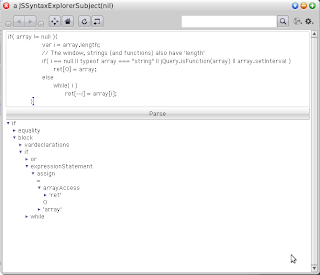


The parser with tests and the other code mentioned can be found here .

Thursday, June 25, 2009

Creating a calendar using Newspeak and Hopscotch

For this post I'm going to show the code for a little calendar UI fragment created using the Newspeak programming language and the Hopscotch framework.

Calendar


Here's how the calendar looks:

Hopscotch calendar experiment

(As you can see, I'm focusing on the functionality for the moment).

The code


As described in "Hopscotch: Towards User Interface Composition" this framework promotes the separation between data (the subject) and the UI elements (presenter) . For this calendar fragment the data part will be the given date and the UI part will be a series of UI elements that represent the days of a month.

Here's an overview of the definition for the HCalendar class:


class HCalendar usingLib: platform = NewspeakObject (
|
...
|
)
(

class CalendarSubject for: date = Subject (
|
...
|
)
(
...
)

class CalendarPresenter = Presenter (
|
...
|
)
(
...
))


The subject


As mentioned above the subject only holds a given date. Some operations are added to make it easy to manipulate it.


class CalendarSubject for: date = Subject (
|
private date = date.
|
)
('as yet unclassified'
changeDayTo: newDay <Number> = (
date:: Date year: year
month: (month name)
day: newDay.
)

createPresenter = (
^CalendarPresenter new subject: self.
)

day ^ <Number> = (
^date dayOfMonth.
)

month ^ <Month>= (
^date month.
)

moveToNextMonth = (
date:: date addMonths: 1.
)

moveToPreviousMonth = (
date:: date addMonths: -1.
)

year ^ <Number> = (
^date year.
))

The presenter


The presenter class is more interesting. It takes the date from the subject and tries to create a representation of the month using Hopscotch fragments. The following snippet shows an overview of the presenter class.


class CalendarPresenter = Presenter (
"Calendar presenter, shows the days of the a month."
|

protected weeksRow
protected monthHolder
|
)
('as yet unclassified'


definition = (
monthHolder::
holder: [
row: {
link: '<' action: [ subject moveToPreviousMonth.
refreshHolders. ].
blank: 1.
column: { header .
weeks. }.
blank: 1.
link: '>' action: [ subject moveToNextMonth.
refreshHolders. ].

}.].
^monthHolder.
)

fragmentForDaysNotInCurrentMonth = (
^label: ' '.
)

header = (
|headerRow|
headerRow:: row: {
filler.
label:: subject month name, ' ' , subject year asString.
filler.
}.
^headerRow.
)


refreshHolders= (
monthHolder refresh.
)

weekDayFragmentFor: dayNumber = (
|dayNumberText|
dayNumberText:: dayNumber asString.

^link: dayNumberText
action: [ subject changeDayTo: dayNumber.
highlightSelectedDay.
].
)

highlightSelectedDay = (
...
)


weeks = (
...
)

addFirstWeekTo: result withDaysFromPreviousMonth: previousMonthDays = (
...
)

addLastWeekTo: result weeksToShow: weeksToShow lastDayAdded: lastDayAdded daysInNextMonthToShow: nextMonthDays= (
...
)

addMonthWeeksTo: result weeksToShow: weeksToShow lastDayAdded: lastday= (
...
)

columnSeparator = (
...
)

createColumnsFromWeekArray: weekArray = (
...
)

)


The weeks method is where most of the work of creating the calendar is done. For space reasons I'm not including it here, see the link at the end of the post for the complete code.

Reusing the calendar


Now that we have the definition of the calendar presenter and subject we can reuse it to create more interesting fragments. For example the following definition could be used to create a date range picker.

class HDateRange usingLib: platform = (
"Date range selector."
|
...
|
)
(

class DateRangePresenter = Presenter (
"Presenter for date range."
|
dateRangeTextHolder
|
)
(
calendar: dateSubject = (
|aCalendar|
aCalendar:: dateSubject createPresenter.
aCalendar onChange: [ dateRangeTextHolder refresh ].
^aCalendar.
)

definition = (
dateRangeTextHolder::
holder: [label: subject initialDate selectedDate asString, ' - ',
subject finalDate selectedDate asString].
^heading: dateRangeTextHolder
details: [
row: {
calendar: subject initialDate .
blank:49.
calendar: subject finalDate.
}]
)

)

class DateRangeSubject from: initial to: final= Subject (
"Data for the date range."
|
private initialDate = (HCalendar usingLib: platform) CalendarSubject for: initial.
private finalDate = (HCalendar usingLib: platform) CalendarSubject for: final.
|
)
(
createPresenter = (
^ (DateRangePresenter new) subject: self.
)))


Code for this post can be found here.

Sunday, June 21, 2009

Using libcurl with Newspeak FFI (continued)

The previous post presented a small low level interface to libcurl using the Newspeak programming language. In this post I'm going to show the HttpServiceClient class, which was created to give a simple interface to the LibCurlHelper class.

The definition for class looks like this:


Newsqueak2
'LangexplrExperiments'

class HttpServiceClient usingLib: platform withCurlPath: curlLibraryPath = (
"This class is used to access services provided by the HTTP protocol"
|
LibCurlHelper = platform LibCurlHelper.
ByteString = platform ByteString.
platform = platform.
Transcript = platform Transcript .
private curlLibraryPath = curlLibraryPath .
|
)
(

class HttpRequestResult curlErrorCode: curlErrorCode httpResponse: httpResponse data: data= (
...
)
(
...
)

createNewCurlInstance = (
...
)

get: url <String> ^ <HttpRequestResult> = (
...
)

get: url <String> withHeaders: headers <Array> ^ <HttpRequestResult> = (
...
)

private isHttpsUrl: url <String> ^ <Boolean> = (
...
)

postForm: formData <Dictionary> to: url <String> ^ <HttpRequestResult> = (
...
)

) : (
...
)


The get:, get: withHeaders: and postForm: to: methods provide the functionally to do very simple GET and POST requests.

The HttpRequestResult encapsulates the result of calling these methods which has the result of calling libcurl, the HTTP response code and the text of the requested data if successful.

The code for the GET methods looks like this:

get: url <String> ^ <HttpRequestResult> = (
| curl data tmpBuffer bufferLength response|
^ get: url withHeaders: {}.
)


get: url <String> withHeaders: headers <Array> ^ <HttpRequestResult> = (
| curl data tmpBuffer bufferLength curlCallResult response|
data:: ''.
curl:: createNewCurlInstance.
curl writeCallback:
[:args :result|
bufferLength:: ((args datasize) * (args nmemb)).
tmpBuffer:: ByteString new: bufferLength.
args data copyInto: tmpBuffer
from: 1 to: bufferLength
in: (args data) startingAt: 1.
data:: data,tmpBuffer.
result returnInteger: bufferLength.
].

headers size > 0 ifTrue: [curl headers: headers].

(isHttpsUrl: url)
ifTrue: [curl noSslVerification.].
curl url: url.

curlCallResult:: curl performOperation.

response:: curl responseCode.
curl cleanup.
^HttpRequestResult
curlErrorCode: curlCallResult
httpResponse: response
data: data.
)


The code for the POST operation looks like this:


postForm: formData <Dictionary> to: url = (
| curl data tmpBuffer bufferLength curlFormData response curlCallResult|
data:: ''.
curl:: createNewCurlInstance.

curl post: formData.
curl writeCallback:
[:args :result|
bufferLength:: ((args datasize) * (args nmemb)).
tmpBuffer:: ByteString new: bufferLength.
args data copyInto: tmpBuffer
from: 1 to: bufferLength
in: (args data) startingAt: 1.
data:: data,tmpBuffer.
result returnInteger: bufferLength.
].

(isHttpsUrl: url)
ifTrue: [curl noSslVerification.].

curl url: url.
curlCallResult: curl performOperation.

response:: curl responseCode.
curl cleanup.
^HttpRequestResult
curlErrorCode: curlCallResult
httpResponse: response
data: data.
)


Code for this post can be found here.

Saturday, June 13, 2009

Using libcurl with Newspeak FFI

In this post I'm going to show a little example of using libcurl from the Newspeak programming language .

Newspeak FFI


Newspeak provides a nice mechanism to call C code. This mechanism is described in
Newspeak Foreign Function Interface User Guide document. The AlienDemo example provided with the Newspeak prototype has some nice small examples of the FFI.

The experiment presented in this post was created using the Newspeak prototype from February 2009. Due to some limitations of this release, this code only works with the Windows version of the prototype.

libcurl


libcurl is a C library that provides client access to several networking protocols with a common interface. For this post I'm going to implement a wrapper for very small subset of the functionality provided by libcurl in order to perform simple HTTP/HTTPS GET and POST requests .

The simple.c example shows how to do a simple GET request.


int main(void)
{
CURL *curl;
CURLcode res;

curl = curl_easy_init();
if(curl) {
curl_easy_setopt(curl, CURLOPT_URL, "curl.haxx.se");
res = curl_easy_perform(curl);
curl_easy_cleanup(curl);
}
return 0;
}


The LibCurlHelper class


A class named LibCurlHelper will be used to encapsulate calls to libcurl. As you will notice the interface of this class is pretty low level. For future posts I'll try to create a better interface using more Newspeak features.


class LibCurlHelper usingLib: platform = (
"This class wraps an implementation of the libcurl library"
|
Transcript = platform Transcript.
Alien = platform Alien.
UnsafeAlien = platform UnsafeAlien.
Callback = platform Callback.
CurlWriteCallback = platform CurlWriteCallbackNs1.
CurlDebugCallback = platform CurlDebugCallback.
ByteString = platform ByteString.
OrderedCollection = platform OrderedCollection.
...
public libcurlPath = ''.
public errorBuffer = ''.
protected CURL_OPT_URL = 10002.
protected CURLOPT_WRITEFUNCTION = 20011.
...

internalDebugCallback = nil.
internalWriteCallback = nil.
formPostData = nil.
private curlInstance = nil.
private aliensToRelease = nil.


CURLFORM_NOTHING = 0 .
CURLFORM_COPYNAME = 1 .
CURLFORM_PTRNAME = 2.
...


libcurl uses a lot of constaints prefixed with "CURL" this class contains definitions for some of them.

Initialization


The initializeCurl method calls the curl_easy_init (as in the simple.c example shown above) and stores the returned pointer in a slot called curlInstance which will be used in further calls.


initializeCurl = (
|curl|
ensureLibrariesLoaded .
(Alien lookup: 'curl_easy_init' inLibrary: curlLibName )
primFFICallResult: (curl:: Alien new: 4).
curlInstance: curl.
)


The ensureLibrariesLoaded and methods.


curlLibName = (
^libcurlPath, 'libcurl.dll'
)
ensureLibrariesLoaded = (
Alien ensureLoaded: libcurlPath, 'libidn-11.dll'.
Alien ensureLoaded: libcurlPath, 'libeay32.dll'.
Alien ensureLoaded: libcurlPath, 'libssl32.dll'.
Alien ensureLoaded: curlLibName.
)


Setting the URL


In order to set the URL for the request we need to call the curl_easy_setopt function with the CURL_OPT_URL with the URL string.

The code looks like this:


url: url <String> = (
|result|
(Alien lookup: 'curl_easy_setopt' inLibrary: curlLibName )
primFFICallResult: (result:: Alien new:4)
withArguments: { curlInstance.
CURL_OPT_URL.
(addAlienToRelease: (url asAlien)) pointer. }.
^result.
)


The addAlienToRelease: method was added to in order to keep track of resources allocated in the C heap that need to be manually released when not needed. The asAlien method of the String class creates a resource of this kind.

The implementation of this method looks like this:


addAlienToRelease: anAlien = (
aliensToRelease isNil ifTrue: [ aliensToRelease:: OrderedCollection new. ].
aliensToRelease add: anAlien.
^anAlien.
)


Setting the write callback


Callback functions are used by libcurl to process the data coming from the network. The Newspeak FFI provides a nice way to add this kind of callbacks.


writeCallback: callback <Block>= (
|result|
internalWriteCallback:: Callback
block: callback
argsClass: CurlWriteCallback.

(Alien lookup: 'curl_easy_setopt' inLibrary: curlLibName )
primFFICallResult: (result:: Alien new: 4)
withArguments: { curlInstance.
CURLOPT_WRITEFUNCTION.
internalWriteCallback thunk. }.

^result.
)


The writeCallback: method sets the block in callback as the libcurl write callback. In order to do this it creates an instance of the Callback class with the block and the arguments class. An instance of this class is used to create a function pointer which is passed to the curl_easy_setopt function.

The "arguments class" is defined using the NS1 Newspeak syntax as follows:


Newsqueak1
'LangexplrExperiments'
CurlWriteCallbackNs1 = Alien (
"Class used to represent arguments of the LibCurl write function."
'as yet unclassified'
data = (
^Alien forPointer: (self unsignedLongAt: 1)
)
datasize = (
^(self unsignedLongAt: 5)
)
nmemb = (
^(self unsignedLongAt: 9)
)
writerData = (
^Alien forPointer: (self unsignedLongAt: 13)
)
) : (
'as yet unclassified'
dataSize = (
^16
))


An instance of this class is used to represent the arguments of a callback call. An example of the use of this function is presented below.

Performing the request


The curl_easy_perform function is used to start the operation. The following code shows the call to this function:


performOperation = (
|r|
(Alien lookup: 'curl_easy_perform' inLibrary: curlLibName )
primFFICallResult: (r:: Alien new: 4)
withArguments: { curlInstance. }.
^r signedLongAt: 1.
)


Cleanup


Finally the following method is used to release the resources allocated by libcurl.


cleanup = (
(Alien lookup: 'curl_easy_cleanup' inLibrary: curlLibName )
primFFICallResult: nil
withArguments: { curlInstance } .

aliensToRelease do: [:anAlien | anAlien free ].
)


Example of using the library


As mentioned above, the LibCurlHelper class provides a low level interface to libcurl, something needs to be created to encapsulate this functionality.

The following method shows a method that preforms a simple GET request and returns the downloaded data as a string.


class HttpServiceClient usingLib: platform withCurlPath: curlLibraryPath = (
"This class is used to access services provided by the HTTP protocol"
|
LibCurlHelper = platform LibCurlHelper.
ByteString = platform ByteString.
platform = platform.
Transcript = platform Transcript .
private curlLibraryPath = curlLibraryPath .
|
)

(
simpleGet: url ^ = (
| curl data tmpBuffer bufferLength response|
curl:: (LibCurlHelper usingLib: platform).
curl libcurlPath: curlLibraryPath .
curl initializeCurl.

data:: ''.
curl:: createNewCurlInstance.

curl writeCallback:
[:args :result|
bufferLength:: ((args datasize) * (args nmemb)).
tmpBuffer:: ByteString new: bufferLength.
args data copyInto: tmpBuffer
from: 1 to: bufferLength
in: (args data) startingAt: 1.
data:: data,tmpBuffer.
result returnInteger: bufferLength.
].
curl url: url.
curl performOperation.
curl cleanup.
^data
)
)


Notice that here the callback function modifies a local variable every time the data arrives. Also notice that args is an instance of CurlWriteCallbackNs1.

Final words


The experiment of using libcurl from Newspeak was a nice way to learn about its foreign function interface. Having access to libcurl access to useful things such as HTTPS requests.

There's already a nice Squeak wrapper for libcurl called CurlPlugin .

Code for this post can be found here.

Tuesday, April 14, 2009

Writing a small Twitter client with Newspeak and Hopscotch

In this post I'm going to show a small Twitter client written using the Newspeak programming language and the Hopscotch framework.

As part of the process of exploring the Newspeak language here I'm going to focus on the Hopscotch UI framework. It will be used to present information from the Twitter REST API which is very easy to use.

The Hopscotch framework and IDE is described in the "Hopscotch: Towards User Interface Composition" paper by Vassili Bykov.

Code for this program was created using the Newspeak prototype from 2009-02-27.

The program


Here's a screenshot of the program:

screenshot fo the twitter client

The program is not a complete client, it just allows to post a new twit and to read the current time line of a the user.

The code from the previous post "Parsing JSON with Newspeak" is used to access the data provided by the Twitter services.


The code


The following screenshot shows the definition of the TwitterGUI class


The following nested classes provide the functionality for the client:

  1. TwitterClient: A class for using the Twitter REST API
  2. TwitPresenter,TwitSubject: The UI piece and information for a single twit
  3. TwitterMainPresenter,TwitterMainSubject: The UI piece and information for a the complete client


As described in the Hopscotch paper a pair of elements is required to create a UI piece. A subject which contains the information being presented and the presenter which defines the UI that shows it.

In the case of a single twit the data is transmitted from the service as a JSON document.

The following code shows an example of the JSON response of a single twit from the Twitter REST API:


[{"in_reply_to_screen_name":null,
"user":{
"description":"Father, husband, friend, developer and late night programming language enthusiast.",
"statuses_count":318,
"utc_offset":-21600,
"profile_background_tile":false,
"profile_background_color":"6E8182",
"following":null,
"profile_text_color":"000000",
"url":"http:\/\/langexplr.blogspot.com",
"name":"Luis Diego Fallas",
"protected":false,
"profile_image_url":"http:\/\/s3.amazonaws.com\/twitter_production\/profile_images\/133285952\/ldnach_normal.png",
"notifications":null,
"profile_link_color":"0000ff",
"profile_background_image_url":"http:\/\/static.twitter.com\/images\/themes\/theme1\/bg.gif",
"created_at":"Mon Jul 28 13:51:55 +0000 2008",
"screen_name":"ldfallas",
"profile_sidebar_fill_color":"e0ff92",
"followers_count":45,
"time_zone":"Central America",
"location":"Costa Rica",
"id":15631932,
"favourites_count":9,
"friends_count":43,
"profile_sidebar_border_color":"87bc44"},
"text":"Experimenting with Hopscotch in Newspeak",
"truncated":false,
"in_reply_to_status_id":null,
"created_at":"Tue Apr 07 14:21:57 +0000 2009",
"in_reply_to_user_id":null,
"id":1469769323,
"favorited":false,
"source":"web"}
...]


A TwitSubject represents one of these pieces of information.


class TwitSubject withTwit: twit images: images= Subject (
"Describe the class in this comment."
|
theTwit = twit.
theImages = images.
|
)
(
createPresenter = (
^TwitPresenter new subject: self.
)
)


The definition of the TwitPresenter looks like this:


class TwitPresenter = Presenter (
"Presenter for a single twit."
|
|
)
(
definition = (
^(padded:( column: {

(row: { link: (subject theTwit user screen_name) action: [] . }) color: ( Color veryVeryLightGray).
row: { image: (subject theImages at: (subject theTwit user profile_image_url)) .
blank: 4.
elastic: twitBody}.

}) with: {3. 3. 2. 2.}) .
)
...
)


The following screenshot shows an example of the previous definition.

Single twit

A special treatment need to be applied to the message since we want to be able to click on links or twitter user id's (not supported right now). The definition of twitBody shows this.


twitBody = (
| text result |
text: subject theTwit text.
((string: text contains: '@') or: [string: text contains: 'http'] )
ifTrue: [ result:: flow: ((text subStrings: {Character space}) collect: [:t | componentFor: t])]
ifFalse: [ result:: textDisplay: text ].
^result
)

componentFor: s = (
|result|
(s includesSubString: '@')
ifTrue: [ result:: link: s action: [] ]
ifFalse: [
(string: s contains: 'http')
ifTrue: [ result:: link: s action: [openLink: s] ]
ifFalse:[ result:: label: s]
].
^result.
)

openLink:url = (
OSProcess command: (browser , ' ' , url).
)


What these methods do is to break the string of the message into words separated by spaces. If a word is an URL or and '@' character a link is created if not a 'label' is created . For the future this code needs to be improved with a better technique to identify urls.

The following code shows the definition of TwitterMainSubject:


class TwitterMainSubject user: userName password: pswd = Subject (
"Main subject."
|

user = userName.
password = pswd.
data
images = Dictionary new.
twitterClient = TwitterClient user: userName password:pswd.

|
)
createPresenter ^ = (
data:: twitterClient getFriendsTimeline.
^TwitterMainPresenter new subject: self
)

twits = (
data:: twitterClient getFriendsTimeline.
^data collect: [:t | TwitSubject withTwit: t images: imagesDictionary].
)

updateStatus: statusText = (
twitterClient updateStatus: statusText.
)
...


This class receives the used and password of the Twitter account. The TwitterClient class provides the access to the Twitter services.

Here's the definition of the TwitterMainPresenter class.


class TwitterMainPresenter = Presenter (
"Presenter for the main section of the GUI client."
|
editor
twitsHolder
charCountHolder

|
)
(

definition ^ <Fragment> = (
^column: {
row: { label: 'What are you doing?'.} .
row: { elastic:twitEditor.} .
row: { getCharCountHolder.
filler.
button: 'Update' action:[updateStatus: (editor editedText asString)].
blank: 5.
button: 'Refresh' action:[twitsHolder refresh].
blank: 5.
}.
row: {
blank: 5.
elastic:: getTwitsHolder
}}
))


The getTwitsHolder method create an instance of an HolderComposer object that allows the content to be recalculated using the refresh method. Here's the definition:


getTwitsHolder = (
twitsHolder:: holder: [ list:: subject twits collect: [ :i | i presenter ] ].
^twitsHolder.
)


Notice also that here we are requesting the list of twits to the subject, which calls the web service again getting new content.

Final words


The experience of using the Newspeak and the Hopscotch framework to create this program was very nice.

One thing that I need to find out is how to prevent the application from blocking when requesting the data from the services.

Code for this post can be found here.

Thursday, April 2, 2009

Parsing JSON with Newspeak

In this post I'm going to show a JSON parser written using the Newspeak parser combinator library.

Newspeak


Newspeak is a new programmming language. From its webpage http://newspeaklanguage.org/:


Newspeak is a new programming language in the tradition of Self and Smalltalk. Newspeak is highly dynamic and reflective - but designed to support modularity and security. It supports both object-oriented and functional programming.


In The Newspeak Programming Platform the authors give a nice introduction to the language and platform.

The first time I heard about Newspeak was by watching the Lang.NET 2008 symposium presentation video by Gilad Braha (available here). In this video, a nice parser combinator library is presented . This parser combinator library is described in the Executable Grammars in Newspeak paper by Gilad Bracha.

Code in this post was written using the Newspeak prototype released February 27 2009.

JSON


In order to learn about the language and platform I decided to create a little parser for JSON (Javascript Object Notation).

JSON is a simple data-interchange format defined in http://www.json.org/ .An example of it:


[{ "name": "Wiston Smith",
"description" :"Protagonist"},
{ "name": "Julia",
"description" :"Lover"},
{ "name": "O Brien",
"description" :"Goverment agent"}]


Parser structure


The parser is defined as a single class with a couple of nested classes. The following image shows the definition of JSON Parser in the Newspeak environment.

definition of the JSONParser class

As described in the "Modularity" section of the The Newspeak Programming Platform paper, top-level classes (in this case JSONParser) doesn't have access to its surrounding scope, it only has access to its own or inherited definitions. This is the reason why the JSONParser has the following definitions:


class JSONParser withParserLib: parserLibrary usingLib: platform = (
"Experiment for JSON parser based on the description from http://www.json.org/fatfree.html "
|
ExecutableGrammar = parserLibrary ExecutableGrammar.
CharParser = parserLibrary CharParser.
PredicateTokenParser = parserLibrary PredicateTokenParser.
Dictionary = platform Dictionary.
OrderedCollection = platform OrderedCollection.
Number = platform Number.
|
)
...


The "withParserLib: parserLibrary usingLib: platform" part defines parameters for the construction of JSONParser. These parameters are used to 'import' classes defined elsewhere.

The following code shows a way to create an instance of the JSONParser class:

|platform parser|
platform:: Platform new.
parser = (JSONParser withParserLib: (BlocklessCombinatorialParsing usingLib: platform) usingLib: platform).
...


The JSONParser nested classes are the following:

  1. CharExceptForParser which is a parser that accepts any character except for the one specified (this is for internal use)
  2. JSONGrammar The definition of the JSON grammar
  3. JSONGrammarWithAST which defines the way the AST is created
  4. JSONObject which is used in the representation of the JSON AST


Grammar


The following code shows the JSON grammar defined using the parsing combinators:


class JSONGrammar = ExecutableGrammar (
"Experiment for JSON grammar based on the description from http://www.json.org/fatfree.html "
|
doubleQuote = (char: $").
backslash = (char: $\).
str = doubleQuote,((backslash, ( char: $" )) |
(backslash, ( char: $/ )) |
(backslash, backslash) |
(backslash, ( char: $r )) |
(backslash, ( char: $n )) |
(backslash, ( char: $t )) |
(charExceptFor: $")) star, doubleQuote.
string = tokenFor: str.

negSign = (char: $-).
plusSign = (char: $+).
digit = (charBetween: $0 and: $9).
dot = (char: $. ) .
num = negSign opt, digit, digit star, dot opt,digit star, ((char: $e) | (char: $E)) opt, (plusSign | negSign) opt,digit star.
number = tokenFor: num.

leftbrace = tokenFromChar: ${.
rightbrace =tokenFromChar: $}.
colon = tokenFromChar: $:.
comma = tokenFromChar: $,.
definition = string,colon,value.
obj = leftbrace, (definition starSeparatedBy: comma),rightbrace.
object = tokenFor: obj.

leftbracket = tokenFromChar: $[.
rightbracket = tokenFromChar: $].
arr = leftbracket, (value starSeparatedBy: comma), rightbracket.
array = tokenFor: arr.

ttrue = tokenFromSymbol: #true.
tfalse = tokenFromSymbol: #false.
null = tokenFromSymbol: #null.

value = string | number | object | array | ttrue | tfalse | null.

|
)
...


For more information on the how this library works, check the Executable Grammars in Newspeak paper.


AST construction


We need to define a way to represent the tree structure(AST) parsed by JSONGrammar. As described in the "Executable Grammars is Newspeak" paper, one of the nice things about Newspeak is that we don't have the modify the grammar definition to add AST construction code. We can do that by inheriting from the original grammar:


class JSONGrammarWithAST = JSONGrammar(
"Parses a JSON File and generates and Ast"
|

|
)
('as yet unclassified'
array = (
^super array wrapper: [:a | (a token at: 2) ].
)


null = (
^ super null wrapper: [:o | nil].
)

number = (
^super number wrapper: [:o | Number readFrom: (flattenCharCollectionToString: (o token)) ].
)

object = (
^super object wrapper:
[:obj | JSONObject withContent:
(Dictionary newFrom: ((obj token at: 2) collect: [:e | (e at: 1) -> (e at: 3)]))].
)

parse: input = (
^super value parse: input.
)

string = (
^super string wrapper:
[:t | flattenCollectedString: (t token at: 2)].
)

tfalse = (
^super tfalse wrapper: [:o | false].
)

ttrue = (
^super ttrue wrapper: [:o | true].
)

...
)


As shown here (omitting some method definitions) the arrays are converted to Ordered collections, the numbers,strings,booleans to its equivalents and JSON objects to instances of JSONObject(described below).

JSONObject


In order to make it easy to use a JSON object in Newspeak the JSONParser class was defined:


class JSONObject withContent: dContent = (
"Instances of this class represent JSON objects."
|
content = dContent.
|
)
('as yet unclassified'
doesNotUnderstand: message = (
| fieldName |
fieldName:: message selector string.
(fieldName beginsWith: 'json_')
ifTrue: [fieldName:: fieldName allButFirst: 5].
^content at: fieldName ifAbsent: [nil].
)

)


This class receives a Dicionary as parameter. This dictionary contains all the name/value pairs of the JSON object definition. We create a definition of the doesNotUnderstand method which as in Smalltalk is called when a message sent to an object doesn't have a explicit way to respond it. We take the name of the message being called and check it against the dictionary.

If the message is prefixed by 'json_', the string after it is used as the key in the dictionary. This is defined this way because JSONObject has definitions inherited from Object (such as 'name').


...
| parsed |
parsed:: parserWithAST
parse: (streamFromString: '[{ "name": "Wiston Smith",
"description" :"Protagonist"},
{ "name": "Julia",
"description" :"Lover"},
{ "name": "O Brien",
"description" :"Goverment agent"}]'
).
assert:[((parsed at: 2) description) = 'Lover'].
assert:[((parsed at: 3) json_name) = 'O Brien'].


In the following post I'm going to use this parser to explore the GUI library provided with Newspeak.

Code for this post can be found here.