Showing posts with label xml. Show all posts

Saturday, June 19, 2010

Generating XML with Newspeak

While experimenting with Newspeak I wrote a small utility class for generating basic XML documents.

An example of its use looks like this:

w:: getTestingWriter: output .
w element: 'foo'
attributes: { {'id'. 'goo'.} }
with: [
w element: 'foo1'.
w element: 'foo2'.
w element: 'foo3'
with: [
w element: 'foo4'
with: [
w text: 'Hello'.
].
w cdata: ''.
].
].


This generates:

<foo id="goo"><foo1 /><foo2 /><foo3><foo4>Hello</foo4><![CDATA[<loo>]]></foo3></foo>


The code for generating XML this way is based on a previous experiment of using Python's 'with' statement to wrap the .NET's System.Xml.XmlWriter class to generate XML.

Code for this post can be found here.

Sunday, June 13, 2010

Parsing XML documents with namespaces in Newspeak

The previous post showed a basic grammar for XML written using Newspeak parsing combinators. Although Newspeak already includes XML support, it is a great exercise to explore another interesting parts of the language.

The grammar


The grammar defined in the previous post looks like this:

class XmlGrammar = ExecutableGrammar(
"Xml 1.0 grammar with namespaces according to http://www.w3.org/TR/REC-xml/ "
|
openAB = char: $<.
closeAB = char: $>.
amp = char: $&.
semicolon = char: $; .
slash = char: $/.


topenAB = tokenFromChar: $<.
tcloseAB = tokenFromChar: $>.
tslash = tokenFromChar: $/.

comment = openAB , (char: $-),(char: $-),
((charExceptFor: $-) | ((char: $-), (charExceptFor: $-))) plus,
(char: $-),(char: $-),closeAB .

letter = (charBetween: $a and: $z) | (charBetween: $A and: $Z).
digit = charBetween: $0 and: $9.

colon = char: $:.

quote = (char:$') .
dquote = (char:$") .

eq = tokenFromChar: $= .

VersionNum = (char:$1), (char: $.) , (charBetween: $0 and: $9) plus.

VersionInfo = (tokenFromSymbol: #version), eq, ((quote, VersionNum,quote) | (dquote, VersionNum, dquote )).

EncName = letter, (letter | digit) star.

EncodingDecl = (tokenFromSymbol: #enconding) , eq , ((quote, EncName ,quote) | (dquote , EncName , dquote )).

yesNo = (tokenFromSymbol: #yes) | (tokenFromSymbol: #no).

SDDecl = (tokenFromSymbol: #standalone), eq, ((quote, yesNo ,quote) | (dquote , yesNo , dquote )).

XMLDecl = (char: $<) , (char: $?) ,(tokenFromSymbol: #xml), VersionInfo , EncodingDecl opt, SDDecl opt,
(tokenFromChar: $?), (char: $>).

dprolog = XMLDecl.

NameStartChar = letter | (char: $_) .

NameChar = NameStartChar | (char: $-) | (char: $.) | digit.

Name = NameStartChar, NameChar star.

NameWithPrefix = Name, colon, Name.

QName = NameWithPrefix | Name.

TQName = tokenFor: QName.

EntityRef = amp, Name ,semicolon .

CharRef = amp, (char: $#), (((char:$x), (digit | letter) plus) | (digit plus)) ,semicolon .

Reference = EntityRef | CharRef.

AttributeContent1 = (charExceptForCharIn: {$< . $". $&. }) | Reference.


AttributeValue = (dquote, AttributeContent1 star,dquote) |
(quote, AttributeContent1 star,quote).

Attribute = TQName ,eq, AttributeValue.

EmptyElemTag = topenAB ,QName, Attribute star, tslash , closeAB .
STag = topenAB ,QName, Attribute star, tcloseAB .
ETag = topenAB ,slash,QName, tcloseAB .

CDStart = topenAB ,(char: $!),(char:$[),(tokenFromSymbol: #CDATA),(char:$[).
CDEnd = (char: $]),(char: $]),(char: $>).

CDSect = CDStart, (charExceptFor: $]) star , CDEnd.

CharData = tokenFor: ((charExceptForCharIn: {$&. $<}) plus).

content = CharData opt, ((element | Reference | CDSect), CharData opt) star.

ComplexElement = STag, content , ETag.

element = EmptyElemTag | ComplexElement .


|
)
(
...
)


XML nodes


The next step was to add support for the creation of data structures representing the XML document. A technique presented in the Executable Grammars[PDF] paper suggest creating a subclass of the grammar which adds the code for creating the XML node tree.

class XmlParserWithXmlNodes = XmlGrammar (
"Basic XmlParser with XML node AST"
|


|)
('as yet unclassified'
Attribute = (
^ super Attribute wrapper: [:name :eq :value | {name. value.}].
)

AttributeValue = (
|flattenString|
^ super AttributeValue
wrapper: [:q1 :chars :q2 |
flattenString:: (chars collect:
[:c | (c isString)
ifTrue: [c at: 1]
ifFalse: [c]]).
String withAll:flattenString ].
)

CDSect = (
^ super CDSect wrapper: [:cs :data :ce | String withAll: data].
)

CDStart= (
^ super CDStart wrapper: [:t :e :b1 :cdata :b2 | 'cdatastart'].
)

CharData = (
^ super CharData wrapper: [:chars | String withAll: (chars token ) ].

)

CharRef = (
|numberStr|
^ super CharRef
wrapper: [:a1 :p :numberChars :sc |
|base|
numberStr:: ((numberChars at: 1) = $x)
ifTrue: [base:: 16.
String withAll: (numberChars at: 2)]
ifFalse: [base:: 10.
String withAll: numberChars].

(Unicode value: (Number readFrom: numberStr base: base)) asString
].
)

ComplexElement = (
|tn attCollection|
tn:: XmlNodes new.
attCollection:: tn Attributes new.

^ super ComplexElement
wrapper: [:s :childNodes :e |
(e asString = s name asString)
ifFalse: [error: 'Open tag different from closing tag'].
s childNodes: childNodes.
s].
)

ETag = (
^ super ETag wrapper: [:o :s :name :c | name].
)

EmptyElemTag = (

^super EmptyElemTag
wrapper: [:oab :name :atts :s :cab |
|tn attCollection|
tn:: XmlNodes new.
attCollection:: tn Attributes new.

atts do: [:att | attCollection addAttributeWithQName: ((att at: 1) token) value: (att at:2)].
tn Element name: name attributes: attCollection childNodes:{} ].
)

EntityRef = (
^ super EntityRef
wrapper: [:a :name :sc |
(entities valueForName: ((name at: 1) at: 1)) asString ].
)

Name = (
^ super Name wrapper: [:startChar :rest | { { (startChar asString), (String withAll: rest) } } ].
)

NameWithPrefix = (
|tn|
tn:: XmlNodes new.
^ super NameWithPrefix
wrapper: [ :prefix :c :name |
{{(prefix at: 1). (name at: 1).}} ].
)

QName = (
|tn|
tn:: XmlNodes new.
^ super QName wrapper: [ :data | ((data size) = 2)
ifTrue:[tn QualifiedName prefix: ((data at:1) at: 1)
localPart:((data at: 2) at:1)]
ifFalse:[tn QualifiedName prefix: nil localPart: (data at: 1)]]
)

STag = (
^super STag
wrapper: [:oab :name :atts :cab |
|tn attCollection|
tn:: XmlNodes new.
attCollection:: tn Attributes new.
"Add attributes"
atts do: [:att | attCollection addAttributeWithQName: ((att at: 1) token)
value: (att at:2)].
"Create elements"
tn Element name: name attributes: attCollection childNodes:{} ].
)

VersionInfo = (
^super VersionInfo
wrapper: [:v :e :versionTextList | versionTextList at: 2].
)

VersionNum = (
^super VersionNum
wrapper: [:one :dot :num |
Number
readFrom: (String withAll: {one.dot},(String withAll: num))].
)

XMLDecl = (
|tn|
tn:: XmlNodes new.
^super XMLDecl
wrapper: [:c1 :c2 :x :versionInfo :enc :sd :c3 :c4 |
tn TAstXmlDecl version: versionInfo
encoding: enc
standalone: sd] .
)

content = (
|result|

^ super content wrapper: [:chars :cseq |
(chars = nil)
ifTrue: [result:: {}]
ifFalse: [result:: {chars}].
cseq inject: result into: [:total :current |
result:: addCompactingStrings: (current at: 1) to: result .
(current at: 2) ifNotNil: [:c | addCompactingStrings: c to: result ].
result ].
].
)

...

)


XML Namespaces


Support for XML namespace resolution was the next step. As described in the Namespaces in XML 1.0 document, XML can have different namespaces for its elements. For example:

<docs:letter docs:xmlns="http://www.foo.com/docs"
pic:xmlns="http://www.foo.com/docs/links">
<docs:paragraph>some text1</docs:paragraph>
<pic:pictureRef location="goo/moo/loo"/>
<docs:paragraph>some text2</docs:paragraph>
</docs:letter>


In this case the 'docs:xmlns' and 'pic:xmlns' attributes associates the 'docs' and 'pics' prefixes to the specified namespaces. So the namespace of the 'letter' element is 'http://www.foo.com/docs'.

Also default namespaces could be specified, like this:

<letter xmlns="http://www.foo.com/docs">

<paragraph>some text1</paragraph>
<pictureRef location="goo/moo/loo"
xmlns="http://www.foo.com/docs/links" />
<paragraph>some text2</paragraph>
</letter>


The basic idea is that xmlns attributes define an scope where a set of prefix/namepace associations and a default namespace are valid. For each start tag a new scope with new declarations must be in context and each end tag must remove the last scope.

Extending the parsing context


In order to do add this functionality, we need to be able to keep a stack with the scopes of namespace declarations that is modified each time we enter or exit from a element declaration. Fortunately, the parser combinator library includes a ParserContext class which is used for keeping track parsing errors.

One problem to use ParserContext was that an instance of it is created inside the CombinatorialParser parse: method which is part of the parsing library. This instance is configured in certain way to process parsing errors. So in order to create add a extended context we needed to somehow replace the ParserContext class with a new implementation.

Luckly, as described in the Modules as Objects in Newspeak[PDF] paper in Newspeak you can override inner class definitions just like you override methods in any other OO language. This means that I can extend the parser library and since ParserContext is defined as an inner class, override its definition to add my own parsing context. The definition of the extended parsing library looks like this:

class ParserLibraryWithXmlContext = parserLibraryClass usingLib: platform (
"A parser library with overwritten parsing context for Xml namespace resolution"
|
parserLibContext = super ParserContext .
|
)
(

class ParserContext = parserLibContext(
"An Xml parser context that keeps track of namespaces."
|
protected prefixes = collections MutableArrayList new: 10.
|
)
('as yet unclassified'
addPrefix: prefix for: namespace = (
|lastLevel|
lastLevel:: prefixes at: (prefixes size).
lastLevel at: prefix put: namespace.

)

namespaceFor: prefix = (
|levelIndex|

levelIndex:: prefixes findLast: [:lvl | (lvl includesKey: prefix) ].
^(levelIndex > 0)
ifTrue: [(prefixes at: levelIndex) at: prefix]
ifFalse: [nil].
)

popLevel = (
prefixes pop.
)

pushLevel = (
prefixes push: (collections MutableHashedMap new).
)


))


This is pretty nice since it allowed us to inject our own implementation of ParsingContext (which extends the original!). An interesting thing to notice is the definition of the parserLibContext which is bound to the base definition of the ParserContext class which we need in order to inherit from it.

Using the extended context


Now having added the new parsing context the next step is to add the code to manipulate the context. In order to do that, we need to add a some functionality to the STag, EmptyElement and ETag productions of the grammar so we can push and pop namespace scopes for each element. In other to do this without modifying the existing functionality three wrappers were created for each of this productions:


class ParserWithNamespaceForStartTag = CombinatorialParser (
"A parser that takes care of modyfing the parsing context for a start tag"
|
innerparser
|
)
('as yet unclassified'
forParser: p = (
innerparser:: p.
)

parse: input inContext: context ifError: blk = (
|result xmlnsAttributes elementName elementNamespace attName|
result:: innerparser parse: input inContext:context ifError:blk.
"First update the context with the newest prefix declarations"
context pushLevel.
xmlnsAttributes:: result attributes allAttributesWithLocalName: 'xmlns'.
xmlnsAttributes
do: [:aPair | context addPrefix: ((aPair at: 1) prefix)
for: (aPair at: 2)].
"Update the element"
elementName:: result name.
elementNamespace:: context namespaceFor: elementName prefix.
elementName namespace: elementNamespace.

"Update the attributes"
result attributes
do: [:aPair |
attName:: aPair at: 1.
attName namespace:
(context namespaceFor: attName prefix)
].

^result.
)

class ParserWithNamespaceForStartEndTag =ParserWithNamespaceForStartTag(
"Parser that takes care of modifying the parsing context for namespace declarations for self closing tags."
|

|
)
('as yet unclassified'
parse: input inContext: context ifError: blk = (
|result|
result:: super parse: input inContext: context ifError: blk.
context popLevel.
^result
)

)

class ParserWithNamespaceForEndTag = CombinatorialParser (
"A parser that takes care of modyfing the parsing context for a end tag"
|
protected innerParser = nil.

|
)
('as yet unclassified'
forParser: parser = (
innerParser:: parser.
)

parse: input inContext: context ifError: blk = (
|result|
result:: innerParser parse: input inContext: context ifError: blk.
context popLevel.
^result
)


As shown here the start tag parser pushes a new scope with the new namespace declarations, while the end tag parser pops a scope.

Now to add this wrappers I created a new subclass of the parser with nodes to add this functionality.

class XmlParserWithNodesAndNamespaces = XmlParserWithXmlNodes (
"An XML Parser that creates a node tree and that resolves the namespaces."
|

|
)
('as yet unclassified'
ETag = (
|newWrappingParser|
newWrappingParser:: ParserWithNamespaceForEndTag new.
newWrappingParser forParser: (super ETag).
^newWrappingParser
)

EmptyElemTag = (
|newWrappingParser|
newWrappingParser:: ParserWithNamespaceForStartEndTag new.
newWrappingParser forParser: (super EmptyElemTag).
^newWrappingParser
)

STag = (
|tn attCollection newWrappingParser|
newWrappingParser:: ParserWithNamespaceForStartTag new.
newWrappingParser forParser: (super STag).
^newWrappingParser
)

)


Code organization


The code for this experiment is organized as follows:

class  XmlTools withParserLibClass: parserLibraryClass usingLib: platform = 
(
...
) (
class XmlParsing withParsingLib: parserLibrary = (
...
)
(
class XmlGrammar = ExecutableGrammar
( ...) ( ... )
class XmlParserWithXmlNodes = XmlGrammar
( ... ) ( ... )
class XmlParserWithNodesAndNamespaces = XmlParserWithXmlNodes
( ... ) ( ... )
...
)

basicParser = (
|parsingLib xmlparsing|
parsingLib:: parserLibraryClass usingLib: platform.
xmlparsing:: XmlParsing withParsingLib: parsingLib.
^xmlparsing XmlParserWithXmlNodes new.
)

parserWithNamespaceSupport = (
|parsingLib xmlparsing|
parsingLib:: ParserLibraryWithXmlContext new.
xmlparsing:: XmlParsing withParsingLib: parsingLib.
^xmlparsing XmlParserWithNodesAndNamespaces new.
)
...
)


Here the XmlTools class definition will represent a module for XML utilities. Its inner definitions include the XmlParsing inner class which defines the grammar along other parsing utilities. The basicParser parserWithNamespaceSupport show an example of how the parser is created.

The following methods show how the XmlTools class is used to create a concrete parser for a basic XML document:

getTestingNsParser = (
|platform|
platform:: Platform new.
^(XmlTools
withParserLibClass: BlocklessCombinatorialParsing
usingLib: platform) parserWithNamespaceSupport.
)

testElementWithOneChildWithNamespaces = (
|parser r ctxt|
parser:: xmlNsParserWrapper: (getTestingNsParser element) .
r:: parser parse: (streamFromString: '') .

assert:[r childNodes size = 1].
assert:[r name asString = 'myElement'].
assert:[r name namespace = 'http://foo'].
assert:[((r childNodes at: 1) name asString) = 'childElement1'].
assert:[((r childNodes at: 1) name namespace) = 'http://foo'].
)


Final words


The nicest think to notice is that the original class containing the grammar for XML was not modified in order to introduce this feature. In fact the parser with XML nodes without namespaces is also available . Also I really liked the way the ParserContext class was replaced which automatically allowed me to add this new functionality.

Code for this post can be found here.

Monday, May 24, 2010

A simple XML Grammar in Newspeak

Recently I've been doing some experiments for parsing XML in using Newspeak parser combinators.

Here's the grammar:


class XmlGrammar = ExecutableGrammar(
"Xml 1.0 grammar with namespaces"
|
openAB = char: $<.
closeAB = char: $>.
amp = char: $&.
semicolon = char: $; .
slash = char: $/.


topenAB = tokenFromChar: $<.
tcloseAB = tokenFromChar: $>.
tslash = tokenFromChar: $/.

comment = openAB , (char: $-),(char: $-),
((charExceptFor: $-) | ((char: $-), (charExceptFor: $-))) plus,
(char: $-),(char: $-),closeAB .

letter = (charBetween: $a and: $z) | (charBetween: $A and: $Z).
digit = charBetween: $0 and: $9.

colon = char: $:.

quote = (char:$') .
dquote = (char:$") .

eq = tokenFromChar: $= .

VersionNum = (char:$1), (char: $.) , (charBetween: $0 and: $9) plus.

VersionInfo = (tokenFromSymbol: #version), eq, ((quote, VersionNum,quote) | (dquote, VersionNum, dquote )).

EncName = letter, (letter | digit) star.

EncodingDecl = (tokenFromSymbol: #enconding) , eq , ((quote, EncName ,quote) | (dquote , EncName , dquote )).

yesNo = (tokenFromSymbol: #yes) | (tokenFromSymbol: #no).

SDDecl = (tokenFromSymbol: #standalone), eq, ((quote, yesNo ,quote) | (dquote , yesNo , dquote )).

XMLDecl = (char: $<) , (char: $?) ,(tokenFromSymbol: #xml), VersionInfo , EncodingDecl opt, SDDecl opt,
(tokenFromChar: $?), (char: $>).

dprolog = XMLDecl.

NameStartChar = letter | (char: $_) .

NameChar = NameStartChar | (char: $-) | (char: $.) | digit.

Name = NameStartChar, NameChar star.

QName = (Name, colon, Name)| Name.

TQName = tokenFor: QName.

EntityRef = amp, Name ,semicolon .

CharRef = amp, (char: $#), (((char:$x), (digit | letter) plus) | (digit plus)) ,semicolon .

Reference = EntityRef | CharRef.

AttributeContent1 = (charExceptForCharIn: {$< . $". $&. }) | Reference.


AttributeValue = (dquote, AttributeContent1 star,dquote) |
(quote, AttributeContent1 star,quote).

Attribute = TQName ,eq, AttributeValue.

EmptyElemTag = topenAB ,QName, Attribute star, tslash , closeAB .
STag = topenAB ,QName, Attribute star, tcloseAB .
ETag = topenAB ,slash,QName, closeAB .

CDStart = topenAB ,(char: $!),(char:$[),(tokenFromSymbol: #CDATA),(char:$[).
CDEnd = (char: $]),(char: $]),(char: $>).

CDSect = CDStart, (charExceptFor: $]) star , CDEnd.

CharData = tokenFor: ((charExceptForCharIn: {$&. $<}) plus).

content = CharData opt, ((element | Reference | CDSect), CharData opt) star.

ComplexElement = STag, content , ETag.

element = EmptyElemTag | ComplexElement .


|
)
...


Code for this experiment can be found here.

Thursday, August 21, 2008

Using Emacs and nXML to edit XAML files

In this post I'll show how to use Emacs and nXML to edit XAML files.

The powerful nXML mode allows the use a RELAX NG schema to validate and to assist the edition of XML documents.

The RELAX NG schema generated in the previous post is used to provide XAML code completion.

As described in the previous post, not all elements of XAML could be mapped to RELAX NG, so validation errors will be displayed on valid documents.

Once you have Emacs and nXML installed the following line could be added to the .emacs file to activate nXML when a XAML file is opened.


(setq auto-mode-alist (cons '("\.xaml$" . nxml-mode) auto-mode-alist))


Also the mode could be activated by typing M-x nxml-mode.

Once a file is opened with the nXML mode, the schema must be specified for that file. The XML -> Set Schema -> File... option is used to specify the silverlight.rnc file created for the previous post.

Setting the XAML schema

Once the schema is load we can start modifying the file. For example the following screenshot shows the result of pressing Control+Enter (C-Return) inside a DoubleAnimation tag.

Presenting available attributes

All the available attributes are presented as possible options.

In several scenarios the schema presents only the valid options for a given context. For example the following screenshot shows the result of pressing Control+Enter after an opening angle bracket inside a StackPanel tag:

Emacs displaying possible options for a StackPanel child

Properties elements are also available, for example the following screenshot shows, available options by pressing Control+Enter after the "<Line." text:

Property Element completion


Code for this post can be found here.

Wednesday, August 20, 2008

Creating a RELAX NG schema from classes using XAML rules with IronRuby

In this post I'm going to show a little IronRuby program that generates a RELAX NG Schema Definition for XAML documents using some of the rules to map XML to classes.

This program is was created by modifiying the code of the
previous post to also generate RELAX NG Compact Syntax.

My goal with this post is to use the generated schema with a tool that supports RELAX NG to assist the creation of XAML document.

As with the previous post mentions, not all XAML rules can be expressed in XSD or in this case in RELAX NG. However I hope that the generated schema at least provides some help for editing XAML files.

Changes to RootClassNode and ClassNode classes

The RootClassNode and ClassNode contains information for classes that need an schema definition.

Here's the method to create the definition for one element:


def write_schema_definition_rlx(file)
ctype_name = @the_type.Name.to_s+"Atts"
file.print("#{ctype_name} = ")

write_properties_definition_rlx(file)

file.puts("")

if (!is_abstract)
file.print("#{@the_type.Name} = element #{@the_type.Name} { #{ctype_name} ,")
write_inner_elements_definition_rlx(file) unless is_abstract
file.puts("}")
end


@children.values.each {|c| c.write_schema_definition_rlx(file)}
end


What this code dos is to create a grammar definition for the attributes of the current class. This definition will be used in the definition of the current element (if not abstract) and in the definition of the descendants of the current element.

The write_properties_definition_rlx method writes the definition of the attributes using the defined properties.


def write_properties_definition_rlx(file)
atts = get_type_properties

file.print "("
file.print atts.map {|p| "attribute #{p.Name} { text } ?"}.join(" , ")
file.print ")*"
end


The write_inner_elements_definition_rlx method adds the definition of the content property if it exists. The add_group_base_type creates a group with all the descendants of the of the type of the content property.


def write_inner_elements_definition_rlx(file)
write_element_properties_definition_rlx(file)
if is_container
file.puts(",")
property_type = get_content_property_type
element_type = get_collection_element_type

if (element_type != nil)

group = @registry.add_group_base_type(element_type.FullName)
file.puts "(#{group} *)"
elsif (@registry.descends_from_base_type(property_type))

group = @registry.add_group_base_type(property_type.FullName)
file.puts(group)
else

file.puts(" text ")
end

end
end


The write_schema_definition_rlx creates the definition of a ClassNode which represents a class that inherits from another class.


def write_schema_definition_rlx(file)
if @the_type.contains_generic_parameters
ctype_name = @the_type.Name.to_s.gsub(/`/,'')+"Atts"
else
ctype_name = @the_type.Name.to_s + "Atts"
end

file.print("#{ctype_name} = #{@the_type.BaseType.Name}Atts")
if get_type_properties.length > 0
file.print(" , ")
write_properties_definition_rlx(file)
end

file.puts("")

if (!is_abstract)
file.puts(" #{@the_type.Name} = element #{@the_type.Name} {")
file.print("#{ctype_name},")
write_inner_elements_definition_rlx(file)
file.puts("}")

end

@children.values.each {|c| c.write_schema_definition_rlx(file)}
end


The generated schema

An example of the generated schema is the following:


TextBlockAtts = FrameworkElementAtts | (attribute FontSize { text } ? , attribute FontFamily { text } ? , attribute FontWeight { text } ? , attribute FontStyle { text } ? , attribute TextAlignment { text } ? , attribute Text { text } ?
... )*
TextBlock = element TextBlock {
TextBlockAtts,(element TextBlock.FontSize {AnyGenElement} | element TextBlock.FontFamily {AnyGenElement} | element TextBlock.FontWeight {AnyGenElement} | element TextBlock.FontStyle {AnyGenElement} | element TextBlock.TextAlignment {AnyGenElement} | element TextBlock.Text {AnyGenElement}
...)*,
(InlineElementGroup *)
}
...
InlineElementGroup = Run | LineBreak


Code for this post and the generated schema can be found here.

Monday, August 11, 2008

Creating an XSD schema from classes using XAML rules with IronRuby

This post presents a little unfinished experiment for creating an XSD Xml Schema definition from classes based on some of the rules to map XAML documents to objects. The program is written in IronRuby and it uses reflection to inspect classes and generate the schema definition.

The goal is to have an XML Schema that could be used in conjunction with an XML editor to create XAML documents (which is useful for those of us who don't have a full Visual Studio version). Although as the XAML Overview document says, there are elements that could not be completely mapped to an schema definition, some of them are mentioned below.

The Silverlight Visual Studio integration already includes a very nice XAML editing capabilities.

I think this experiment is a great way to learn more about IronRuby and how to use it to call .NET Libraries.

The strategy

What the program will do is to navigate all the classes inheriting from System.Windows.DependencyObject and generate and XML element and a complex type definition with all the properties included in the definition. For this experiment only two mappings are implemented: properties and content properties.

Properties

As the XAML Overview document describes two ways for specifying properties:


  1. By using XML attributes

  2. By using a class.property-name element


This means that:

This


<Button Background="Blue" >
...
</Button>


and


<Button>
<Button.Background>
<SolidColorBrush Color="Blue">
</Button.Background>
...
</Button>


are equivalent.

So the alternative is to create both the attribute and the property element definitions in the schema.

Content properties

For elements that contain the ContentPropertyAttribute a special child element will be created with a reference to a sequence of all identified concrete elements that in inherit from the property type. As discussed below, this definition is not complete for content properties that accept basic types such as a string.


The program

Some constant and variable definitions


require 'mscorlib'
require 'System.Xml, Version=2.0.0.0, Culture=neutral, PublicKeyToken=b77a5c561934e089, processorArchitecture=MSIL'
include System::Xml
include System::Reflection

SILVERLIGHT_FOLDER = "c:\\Program files\\Microsoft Silverlight\\2.0.30523.8\\"
BASE_TYPE_NAME = "System.Windows.DependencyObject"
CONTENT_PROPERTY_ATTRIBUTE = "System.Windows.Markup.ContentPropertyAttribute"

SILVERLIGHT_NAMESPACE = "http://schemas.microsoft.com/client/2007"
EXTRA_ATTRIBUTES_NAMESPACE = "http://schemas.microsoft.com/winfx/2006/xaml"
XSD_NAMESPACE = "http://www.w3.org/2001/XMLSchema"
CONCRETE_ELEMENTS_GROUP_NAME = "UIElementsGroup"

PRESENTATION_FRAMEWORK_COLLECTION_BASE_TYPE = "PresentationFrameworkCollection`1"


The main program

The main program looks like this:


begin

silveright_system_assembly = Assembly.reflection_only_load_from(SILVERLIGHT_FOLDER + "system.dll")
silveright_windows_assembly = Assembly.reflection_only_load_from(SILVERLIGHT_FOLDER + "System.Windows.dll")
silveright_core_assembly = Assembly.reflection_only_load_from(SILVERLIGHT_FOLDER + "System.Core.dll")
silveright_net_assembly = Assembly.reflection_only_load_from(SILVERLIGHT_FOLDER + "System.Net.dll")
silveright_xml_assembly = Assembly.reflection_only_load_from(SILVERLIGHT_FOLDER + "System.Xml.dll")


registry = Registry.new(silveright_windows_assembly)

registry.collect_data

registry.generate_xsd_schema
puts 'Done!'

rescue System::Reflection::ReflectionTypeLoadException => tl
puts tl
puts tl.LoaderExceptions
rescue System::IO::FileLoadException => e
puts e
puts "-----"
puts e.FusionLog
end


As presented here, the program first collects data about the classes stored in the System.Windows.dll Silverlight library and then generate the XSD schema definition.

The Registry class

The Registry class stores information on the identified classes and keeps track of element groups to be generated.

The collect_data method of the Registry class looks like this:


class Registry

def initialize(types_assembly)
@groups = {}
@types_assembly = types_assembly
@additional_types = {}
@classes = {}
end

...

def get_or_create(name,registry)
if @classes.has_key? name
return @classes[name]
else
return (@classes[name] = ClassNode.new(name,nil,registry))
end
end


...

def collect_data
base_type = @types_assembly.GetType(BASE_TYPE_NAME)
@classes[base_type.FullName] = RootClassNode.new(BASE_TYPE_NAME,base_type,self)

@types_assembly.get_types.each do |a_type|
if (base_type.is_assignable_from a_type and base_type.FullName != a_type.FullName )
node = get_or_create(a_type.full_name,self)
node.the_type = a_type
parent = get_or_create(a_type.BaseType.full_name,self)
parent.add_child(node)

puts "Adding #{a_type.FullName}"
end
end
end

end


As shown here the collect_data method iterates all the classes in the assembly, asking for elements that descend from System.Windows.DependencyObject. For each of these classes an instance of the ClassNode class is created.
If you are familiar with the .NET Reflection API you will recognize some of the names presented here such as is_assignable_from which is a call to the IsAssignableFrom method. As described here, IronRuby allows you to call existing .NET method names using Ruby naming convention .

Generating the Schema

The XSD schema is generated in the generate_xsd_schema Registry method which looks like this:


def generate_xsd_schema
base_type = @types_assembly.GetType(BASE_TYPE_NAME)
swriter = System::IO::StreamWriter.new("silveright.xsd")
writer_settings = XmlWriterSettings.new()
writer_settings.Indent = true
w = XmlWriter.Create(swriter,writer_settings)
w.write_start_document
w.write_start_element("schema",XSD_NAMESPACE)
w.write_attribute_string("targetNamespace",SILVERLIGHT_NAMESPACE)
w.write_attribute_string("elementFormDefault","qualified")
w.write_attribute_string("xmlns","sl",nil,SILVERLIGHT_NAMESPACE)
w.write_attribute_string("xmlns","x",nil,EXTRA_ATTRIBUTES_NAMESPACE)

w.write_start_element("import",XSD_NAMESPACE)
w.write_attribute_string("namespace",EXTRA_ATTRIBUTES_NAMESPACE)
w.write_attribute_string("schemaLocation","extraxamldefs.xsd")
w.write_end_element()

@classes[base_type.FullName].write_schema_definition(w)


create_additional_type_definitions(w)
create_concrete_elements_group(w)

w.write_end_element
w.write_end_document

w.Close
swriter.Close
end


As shown here a .NET XmlWriter class is used to generate the schema.

The write_schema_definition of the RootClassNode and ClassNode classes generates all the appropriate definitions for each class.


For the RootClassNode which represents classes that don't inherit from the DependencyObject the code looks like this:


class RootClassNode
attr_accessor :name,:the_type,:children

def initialize(name,the_type,registry)
@the_type = the_type
@name = name
@children = {}
@registry = registry
end

...

def write_schema_definition(writer)
ctype_name = @the_type.Name.to_s+"Type"
writer.write_start_element("complexType",XSD_NAMESPACE)
writer.write_attribute_string("name",ctype_name )

write_inner_elements_definition(writer) unless is_abstract

write_properties_definition(writer)
if (@the_type.FullName.to_s == BASE_TYPE_NAME)
writer.write_start_element("attributeGroup",XSD_NAMESPACE)
writer.write_attribute_string("ref","x:extraAttributes")
writer.write_end_element
end

writer.write_end_element

write_element_definition(writer,ctype_name) unless is_abstract

@children.values.each {|c| c.write_schema_definition(writer)}
end

end


A complex type is generated with the content of the current class. The write_inner_elements_definition method writes all the description of the child nodes for this complexType, for example it writes the property/element definitions and child node references. The write_properties_definition
method writes the attribute definitions for all the properties.

Also for all base types, a reference to an attribute group of "extraAttributes" is generated. This attribute group contains reference to definitions for some of the XAML attributes such as x:Name. More information about these attributes can be found in XAML Namespace (x:) Language Features.

Finally an element definition is created if the class is not abstract.

For classes inheriting from DependencyObject, a ClassNode instance is created.


class ClassNode < RootClassNode

def write_schema_definition(writer)

if @the_type.contains_generic_parameters
ctype_name = @the_type.Name.to_s.gsub(/`/,'')+"Type"
else
ctype_name = @the_type.Name.to_s + "Type"
end

writer.write_start_element("complexType",XSD_NAMESPACE)
writer.write_attribute_string("name",ctype_name )

writer.write_start_element("complexContent",XSD_NAMESPACE)
writer.write_start_element("extension",XSD_NAMESPACE)
writer.write_attribute_string("base","sl:#{@the_type.BaseType.Name}Type")
write_inner_elements_definition(writer) unless is_abstract
write_properties_definition(writer)
writer.write_end_element


write_element_definition(writer,ctype_name) unless is_abstract

@children.values.each {|c| c.write_schema_definition(writer)}
end
end


The main difference with BaseClassNode is that a complex type extension to the base type is generated. This will reduce the number of attribute definitions of each complex type.

Writing child node references

In order to allow sequences of heterogeneous elements as child nodes of XAML elements, a group definition is created with a choice that references every concrete type.

For example for elements that have a content property of type UIElement the following group is generated:


<group name="UIElementGroup">
<choice>
<element ref="sl:Path" />
<element ref="sl:Ellipse" />
<element ref="sl:Line" />
<element ref="sl:Polygon" />
<element ref="sl:Polyline" />
<element ref="sl:Rectangle" />
...
</choice>
</group>


Combining Enum values

The only way, that I could find, for combining .NET Enum values was to use a combination of Convert.ToInt32 and Enum.ToObject. The following function was used to do that.


def combine(enum_type,enum_values)
System::Enum.ToObject(
enum_type.to_clr_type,
((enum_values.map {|e_value|
System::Convert.ToInt32(e_value)}).inject {|i,j| (j | i)}))
end


A use of this function for combining BindingFlags looks like this:


p = @the_type.get_property(
c.to_string,
combine(BindingFlags,
[BindingFlags.Instance,
BindingFlags.Public,
BindingFlags.NonPublic]))

result_type = p.PropertyType


Elements not mapped

As mentioned at the beginning of the document, not all XAML document features can be accurately represented using XSD. Some of the things that I noticed:


  • Couldn't find a way to define attached properties. A possible workaround is to generate all possible attached property definitions

  • Content properties that allow strings are not represented. This is difficult since it has conflicts with the property/element definitions. Mixed content could be a possible workaround.

  • Extensibility: no easy way to represent things outside of System.Windows. This is a very difficult problem, maybe things like substitution groups could help to represent future child nodes.


Using the generated schema

With the schema generated, an XML editor with XSD Schema aware completion can be used. For example here it is used in Eclipse with XML editor tools included in WTP.
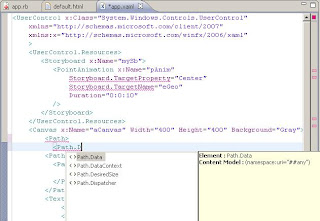


I tried to use the schema with the Netbeans 6.1 IDE (which was used as the Ruby editor for this code) however for schema completion it requires you to specify the schemaLocation attribute. Using this attribute or declaring the xsi namespace generates an error when the XAML is loaded at runtime!.


Code and generated schema for this post can be found here.

Tuesday, May 20, 2008

Processing Xml in Snobol4

In this post a quick way to process XML files using a SAX-like method in SNOBOL4 is presented.

I couldn't find a tool for XML parsing/processing for SNOBOL4 so I decided to try to create one to learn more about the language. I decided to use SAX method because is simpler to implement and lets me focus in the text processing part of the code .

Since SNOBOL4 works consumes the input line by line, a function to flatten all the input was created. This helps by eliminating the problem of considering line breaks, but it also makes the code very inefficient since it creates a big line with all the code in in the XML file.


Define('ReadAll()content,tcontent') :(RA_END)
ReadAll
content = ''
RA_LOOP
tcontent = INPUT : F(ERA_LOOP)
content = content tcontent : (RA_LOOP)
ERA_LOOP
ReadAll = content :(RETURN)
RA_END


Having this problem solved, the Xml processing function looks as follows:


Define('ReadXml(inputStr,iPos,fTStart,fTEnd,fText)iPos,fPos,name,closing,attsString,text') :(RX_END)
ReadXml
&anchor = 0
Init
XmlDirectiveL
inputStr POS(iPos) '<?' ARB '?>' @fPos :F(TagStartL)
iPos = fPos :(Init)

TagStartL
inputStr POS(iPos) '<' SPAN(TagChar) $ name ARB $ attsString ('/>' | '>') $ closing @fPos :F(EndTagL)
attsTable = ReadAttributes(attsString)
iPos = fPos
APPLY(fTStart,name,attsTable) :(Init)

EndTagL
inputStr POS(iPos) '</' SPAN(TagChar) $ name '>' @fPos :F(BlanksL)
iPos = fPos
APPLY(fTEnd,name) :(Init)

BlanksL
inputStr POS(iPos) SPAN(Blank) @fPos :F(TextL)
iPos = fPos :(Init)
TextL
inputStr POS(iPos) BREAK('<') $ text @fPos :F(RXXS_END)
iPos = fPos
APPLY(fText,text) :(Init)

RXXS_END

:(RETURN)
RX_END


This code keeps track of the position in the string where the last XML element structure matched by using the iPos variable. The '@' symbol followed by a variable records the position in the input string at a given moment.

Each part of this function marked by the labels XmlDirectiveL, TagStartL, EndTagL, BlanksL, TextL matches one XML element and calls a callback function specified by the fTStart, fTEnd and fText parameters. The call is made by using the APPLY function.

The contents of the ReadAttributes function is the following.


TagChar = 'abcdefghijklmnopqrstuvwxyzABCDEFGHIJKLMNOPQRSTUVWXYZ:-'
AttNameChar = TagChar
Blank = " "

Define("ReadAttributes(text)result,attsText,iPOS,fPOS,name,value") :(ratts)
ReadAttributes
result = table()
attsText = trim(text)
iPOS = 0
ratts_loop
attsText POS(iPOS) ARBNO(' ') SPAN(AttNameChar) $ name ARBNO(' ') '=' ARBNO(' ') '"' BREAK('"') $ value '"' @fPOS :F(ratts_loop_end)
result = value
iPOS = fPOS :(ratts_loop)
ratts_loop_end
ReadAttributes = result :(Return)
ratts


An example of the use of these functions is the following:


-include "xmlp.sno"

Define('MyTSFunc(name,attributesTable)') :(MTS_END)
MyTSFunc
OUTPUT = "Into " name
OUTPUT = "id=" attributesTable["id"] :(RETURN)
MTS_END

Define('MyTEFunc(name)') :(MTE_END)
MyTEFunc
OUTPUT = "Out of " name :(RETURN)
MTE_END

Define('MyTTFunc(text)') :(MTT_END)
MyTTFunc
OUTPUT = "Text: " text :(RETURN)
MTT_END

OUTPUT = "XML Test"
Txt = ReadAll()
ReadXml(Txt,0,.MyTSFunc,.MyTEFunc,.MyTTFunc)
END


Given the following input:

<uno>
<dos id="3">
asdf
<tres id="4">
h hh
</tres>
<cuatro>
iasdl
</cuatro>
<cinco id="42"/>
</dos>
</uno>


The program generates:


XML Test
Into uno
id=
Into dos
id=3
Text: asdf
Into tres
id=4
Text: h hh
Out of tres
Into cuatro
id=
Text: iasdl
Out of cuatro
Into cinco
id=42
Out of dos
Out of uno


The benefit of using a SAX-like approach is that the code could be reused for other programs. For example the following program prints all the links and the titles from an OPML file from Google Reader.


-include "xmlp.sno"


Define('TagVisitHandler(name,attributesTable)theUrl,title') :(TVH_END)
TagVisitHandler
name "outline" :F(Return)
title = attributesTable["text"]
theUrl = attributesTable["htmlUrl"]
ident(theUrl , '') :s(return)
OUTPUT = "Link for " title " : " theUrl :(RETURN)
TVH_END

Define('MiTEFunc(name)') :(MTE_END)
MiTEFunc :(RETURN)
MTE_END

Define('MiTTFunc(text)') :(MTT_END)
MiTTFunc :(RETURN)
MTT_END

Txt = ReadAll()
ReadXml(Txt,0,.TagVisitHandler,.MiTEFunc,.MiTTFunc)
END


Documentation from SNOBOL4.ORG was used as reference.

Saturday, May 10, 2008

Transforming XML with Tom

In this post I'm going to show some of the features that the Tom pattern matching compiler provide for Xml manipulation.

Xml support

Tom provides support for Xml literals to perform tree creation or pattern matching on a existing tree.

The Manipulating Xml documents section of the documentation provide a nice presentation on this feature. Also nice examples come with Tom distribution.

The example

In order to illustrate Tom Xml capabilities an existing simple XSLT sheet will be converted to a equivalent Tom program.

The following simple XSLT sheet takes an RSS feed and converts it into an HTML file with a table that contains the headlines and the categories listed in the RSS file.


<?xml version="1.0" encoding="utf-8" ?>
<xsl:stylesheet version="1.0"
xmlns:xsl="http://www.w3.org/1999/XSL/Transform"
xmlns="http://www.w3.org/TR/xhtml1/strict">

<xsl:template match="/">
<html>
<head>
<title>Headlines</title>
</head>
<body>
<xsl:apply-templates/>
</body>
</html>
</xsl:template>

<xsl:template match="channel">
<table style="border-style=solid">
<tr>
<th>Headline</th>
<th>Categories</th>
</tr>

<xsl:for-each select="item">
<tr>
<td>
<xsl:value-of select="title/text()"/>
</td>
<td>
<ol>
<xsl:apply-templates select=
class="srctext">"category"
/>
</ol>
</td>
</tr>
</xsl:for-each>
</table>
</xsl:template >

<xsl:template match="category">
<li>
<xsl:value-of select="./text()"/>
</li>
</xsl:template>
<xsl:template match="text()">

</xsl:template>
</xsl:stylesheet>


Loading the Xml

The first step is to load the Xml file. The following code shows the main method that calls the load, transform and print methods for the input file.


%include{ adt/tnode/TNode.tom }

static XmlTools xtools = new XmlTools();

static TNode loadOpmlDocument(String filename) {
return (TNode)xtools.convertXMLToTNode(filename);
}

public static void main(String[] args) {
TNode opmlDocument =
loadOpmlDocument("anrss.rss");

TNode docElem = opmlDocument.getDocElem();
TNode transformedHtml = transform(docElem);

xtools.printXMLFromTNode(transformedHtml);
}


HTML document generation

The transform method is equivalent to the XSLT template that matches the root element. It only generates the HTML document declaration.


static TNode transform(TNode docElem) {
return `xml(
<html>
<head>
<title>#TEXT("Headlines")</title>
</head>
<body>
transformBody(docElem);
</body>
</html>);
}


Note here the use of the xml(...) construct . When using this construct literal Xml could be specified. Also note that a backquote(`) character is used meaning that we're using Tom-specific syntax.

Table generation

The transformBody is equivalent to the XSLT template that matches the channel element. It creates the table with its headers.


static TNode transformBody(TNode docElem) {
%match(docElem) {
<rss>
channel@<channel>
_*
</channel>
</rss> ->
{TNodeList itemRows = transformItems(`channel);
return
`xml(<table style="border-style=solid">
<tr>
<th>#TEXT("Headline")</th>
<th>#TEXT("Categories")</th>
</tr>
itemRows*
</table> );}
}
return `xml(#TEXT(""));
}


Note that the %match construct has Xml code in the pattern section.

Also note that here we call transformItems to generate a node list(itemRows) that will be all the rows of the table. Also note that the itemRows variable is expanded in the middle of the table.

Transforming items

The transformItems process every item and generates a list of HTML table rows.


static TNodeList transformItems(TNode channel) {
TNodeList result = EmptyconcTNode.make();

%match (channel){
<channel>
item@<item>
<title>theTitle</title>
</item>
</channel> -> {
result =
ConsconcTNode.make(
`xml(<tr>
<td>
theTitle
</td>
<td>
categories(item)
</td>
</tr>),
result);
}
}
return result.reverse();
}


Here the multiple results generated by the %match construct is used to fill the list with all the rows.

Something that might be confusing is that the %match pattern seems to be looking for a single item with title as its only child (because of the lack of _* constructs). This is something specific to the Xml literal syntax, as documentation says implicit _* constructs are added between Xml literals.

Mapping categories

The categories method maps each category and is equivalent XSLT template that matches a category.


private static TNode categories(TNode item){
TNodeList listItems = EmptyconcTNode.make();

%match(item) {
<item>
<category>
category
</category>
</item> -> {
String value = getTextFromCategory(`category);
listItems =
ConsconcTNode.make(
`xml(<li>#TEXT(value)</li>),
listItems);
}
}
listItems = listItems.reverse();
return `xml(<ol>listItems*</ol>);
}


Final words

Although I'm not a big fan of Xml literals, it is nice way to create a new tree compared to using W3C DOM classes. Xml literals are used in several languages today such as Scala or Visual Basic 9. A nice alternative is Groovy Builders which provide a nice syntax to create tree structures that is independent of the backend .

One of the things that was missing(at least from the documentation) was direct support for Xml namespaces which is useful when working with multiple Xml Schemas from different sources.

Tuesday, August 14, 2007

First steps to generate sample XML files from XSD with Ruby

As my first non-"hello world" program in Ruby I wanted to create something that was useful for me (or at least something entertaining). A couple of weeks ago I had the necessity of generating a sample file for a given XSD Schema . Eclipse already does something like this, but I thought it was a fun programming exercise.

I wanted to create something that loads the XSD Schema into a object structure that can be queried in order to the determine the elements that will be generated. I didn't look for a existing library that does this because it will be a much better exercise to try to build it myself. However creating something that support the full XSD specification like this or this is a HUGE task so I chose to support only a small subset of it.

For XML parsing and generation, I'm using REXML which is a very nice library for XML manipulation.

The basic strategy for loading the XSD Schema is to create a collection of classes that handles each part of the supported schema features. For example SchemaElement for supporting element declarations and SchemaComplexType was created for supporting the complexType declarations.

Since an XSD Schema is a common XSD document loading each element is done by using a load_from , for example for SchemaElement the load_from method looks like this:

class SchemaElement
...
def load_from(elementDefinition,prefixes)

@name = elementDefinition.attributes["name"]
if (elementDefinition.attributes["type"]) then
@element_type = Reference.new(elementDefinition.attributes["type"],prefixes)
end
if (elementDefinition.attributes["substitutionGroup"]) then
@substitution_group = Reference.new(elementDefinition.attributes["substitutionGroup"],prefixes)
end

elementDefinition.find_all {|e| !e.is_a?(REXML::Text)}.each{|e|
case e.name
when "complexType"
ct = SchemaComplexType.new
ct.load_from(e,prefixes)
@element_type = ct
else
print ""Warning: ignoring #{e}"
end
}

end
...
end


As shown in the load_from method, there're relationships between schema elements, for example the type of the element could be a type defined elsewhere inside this schema or an imported schema. Once the schema is loaded, there's a process that takes the references and replace them with a real reference to the object. For the SchemaElement the solve_references_method looks like this:

class SchemaElement
...
def solve_references(collection)
if @substitution_group.is_a? (XSDInfo::Reference) then
@substitution_group = collection.get_type(
@substitution_group.namespace,
@substitution_group.name)
end

if @element_type.is_a?(XSDInfo::Reference) then
if(r = collection.get_type(@element_type.namespace,@element_type.name)) then
@element_type = r
else
print "Not found #{@element_type.namespace}.#{@element_type.name}\n"
end
else
if !@solving then
@solving = true
@element_type.solve_references(collection) unless @element_type == nil
@solving = false
end
end
end
...
end


Here collection points to a SchemaCollection object that holds all the loaded schemas.

Having all this we can load an XSD Schema and start querying for its parts, for example, we can get the list of attributes that apply to the b tag in the XHTML schema:


$ irb -r xsd/xsd.rb
irb(main):001:0> sc = XSDInfo::SchemaCollection.new
=> #<XSDInfo::SchemaCollection:0xb7b71170>
irb(main):002:0> sc.add_schema XSDInfo::SchemaInformation.new("../xhtml1-strict.xsd")
irb(main):003:0> sc.namespaces.each {|ns| sc[ns].solve_references sc}
=> ["http://www.w3.org/1999/xhtml"]
irb(main):004:0> sc["http://www.w3.org/1999/xhtml"].elements["b"].all_attributes.collect {|x| x.name}
=> ["onkeydown", "onkeypress", "onmouseover", "onkeyup", "onmousemove", "onmouseup", "ondblclick", "onmouseout", "onmousedown", "onclick", "title", "class", "id", "style", "dir", nil, "lang"]


Now, for generating the XML sample we can create a generate_sample for each part of the schema. For example the generate_sample for the SchemaComplexType looks like this:


## Sample Generation

def generate_sample_content(e,context)
atts = all_attributes.select {|x| x.name != nil && rand > 0.7}
atts.each {|att|
sample_length = 1 + (10*rand).to_i
sample_text = (1..sample_length).to_a.collect{ |p|
ltrs = ("a"[0].."z"[0]).to_a
ltrs[(ltrs.length*rand).to_i]
}.pack("c"*sample_length)
e.attributes[att.name] = sample_text
}

self.all_content_parts.each {|p| p.generate_sample_content(e,context)}
end


The value of the attributes must be valid according to its simple type. However this is not supported right now.

Another example for the generate_sample method for the SchemaChoice class is the following:


def generate_sample_content(e,context)
if (@minOccurs == 1 && @maxOccurs == 1) then
element_to_gen = @elements[(rand*@elements.length).to_i]
element_to_gen.generate_sample_content(e,context)
elsif (@minOccurs == 0 && @maxOccurs == 1) then
element_to_gen = @elements[(rand*@elements.length).to_i]
element_to_gen.generate_sample_content(e,context) unless rand < 0.5
elsif (@maxOccurs == "unbounded") then
(1..(rand * 4).to_i).each {|i|
element_to_gen = @elements[(rand*@elements.length).to_i]
element_to_gen.generate_sample_content(e,context) unless rand < 0.5
}
end
end


Now with all this infrastructure we can generate some sample XML files:

def generate_sample_html_element name
sc = XSDInfo::SchemaCollection.new
sc.add_schema XSDInfo::SchemaInformation.new("../xhtml1-strict.xsd")
sc.namespaces.each {|ns| sc[ns].solve_references sc}
doc = REXML::Document.new
f = File.new("output.xml","w")
doc.elements << sc[sc.namespaces[0]].elements[name].a_sample
doc.write(f,3,false,false)
f.close
return sc
end


We call:


irb(main):006:0> generate_sample_html_element "b"


Generates:


<b class="zlxzzyunen" onkeydown="uaqz" onkeypress="kqyqmqn" onmouseover="sevcgov" onkeyup="ezglfa" lang="ckn" ondblclick="gfaskd" onmousedown="jwed" onclick="m">
<script/>
<del ondblclick="xeepat"/>
<del cite="ymtye" title="wldaeawdi" onmouseover="fnk" id="sd" onmouseup="bfqxp" onkeyup="esyfhq">
<a tabindex="lcofhfti" href="ffuuebwn" title="jxhl" onkeydown="fsdwqt" rev="btbsuhl" onmouseup="zerecv" onkeyup="agwsyz" shape="htswqoew" onmousedown="ny" onclick="hq">
<object codetype="xbzmtvzd" onkeydown="ibsuthweoa" archive="ivav" onkeypress="sbhvtgvds" onmousemove="ll" onmousedown="kgbpgzj" onmouseout="nrpdnipw" classid="qwqzkzd" onclick="cybmhyab" usemap="aubjg"/>
</a>
</del>
</b>


Generation is allways different because we're using the rand function for many parts of the process.

Code for this experiment can be found here.

Wednesday, May 30, 2007

Using Scala Extractors with the XSD Schema Infoset Model

In this post I'm going to use Scala extractor objects with the Eclipse XML Schema Infoset Model to identify common ways of defining XML Schemas.

Hopefully I'm going to show that complex patterns on common Java objects can be identified using Scala extractors.

The Eclipse Schema Infoset Model is a complex EMF model the represents the W3C XML Schema. The Analyzing XML schemas with the Schema Infoset Model and Analyze Schemas with the XML Schema Infoset Model articles provide a nice explanation on how to work with this model.

For this post I wanted to create Scala patterns that identify common design patterns in Xml Schemas. There are four common patterns for XML Schemas: Russian Doll, Salami Slice, Venetian Blind and Garden of Eden.

The article Introducing Design Patterns in XML Schemas provide a nice explanation on each of this patterns. Also the article talks about a nice feature of NetBeans Enterprise Pack that allows the user to move a schema from one design pattern to another. More information on these design patterns can be found on the article Global vs Local from the xFront site.

The W3C XML Schema model is huge, but for this post I'm going to consider only a small subset.

The first step is the definition of the extractor objects that will be used to have access to certain properties of the Xml Schema Infoset model.


package langexplr.scalaextractorexperiments;

import org.eclipse.emf.ecore.resource._
import org.eclipse.emf.ecore.resource.impl._
import org.eclipse.xsd._
import org.eclipse.xsd.impl._
import org.eclipse.xsd.util._
import org.eclipse.emf.common.util.URI

object XSDSchemaParts {
def unapply(schema : XSDSchema) =
Some ((schema.getTargetNamespace(),
List.fromIterator(
new JavaIteratorWrapper[XSDTypeDefinition](
schema.getTypeDefinitions().iterator())),
List.fromIterator(
new JavaIteratorWrapper[XSDElementDeclaration](
schema.getElementDeclarations().iterator()))))

}

object XSDElementParts {
def unapply(elementDeclaration : XSDElementDeclaration) =
Some((elementDeclaration.getName(),elementDeclaration.getTypeDefinition()))


}

object XSDComplexType {
def unapply(typeDefinition : XSDTypeDefinition) =
if (typeDefinition.isInstanceOf[XSDComplexTypeDefinition]) {
val complexType = typeDefinition.asInstanceOf[XSDComplexTypeDefinition];
Some((complexType.getName(),complexType.getContent()))
} else {
None
}

}

object XSDSimpleType {
def unapply(typeDefinition : XSDTypeDefinition) = {
if (typeDefinition.isInstanceOf[XSDSimpleTypeDefinition]) {
Some(typeDefinition.asInstanceOf[XSDSimpleTypeDefinition])
} else {
None
}
}
}

object XSDParticleContent {
def unapply(p : XSDParticle) = Some(p.getContent())
}

object XSDSimpleSequenceModelGroup {
def unapply(complexTypeContent : XSDComplexTypeContent) = {
complexTypeContent match {
case XSDParticleContent(mg : XSDModelGroup)
if (mg.getCompositor().getName == "sequence") =>
Some(
List.fromIterator(
new JavaIteratorWrapper[XSDParticle](
mg.getContents.iterator())))
case _ => None
}
}


The XSDSchemaParts, XSDElementParts, XSDComplexType, XSDSimpleType, and XSDParticleContent extractor objects provide access to some properties of a model object. For example the XSDSchemaParts returns a tuple with the target namespace, the complex type definitions and the element definitions.

Also the XSDSimpleSequenceModelGroup provide an easy way to identify a common pattern that is the use of a XSD sequence as the type main element.

A class will be created for each design pattern. The following trait is the base for all of them:


trait XsdDesignPattern {
def name : String
def identify(schema:XSDSchema) : boolean
}


Now we can define each pattern:

Russian Doll

This design pattern says that the structure of the XML Schema is similar to the document structure. Only one public element is defined and all other elements are defined inside of it.

For example:


<?xml version="1.0" encoding="UTF-8"?>
<xs:schema xmlns:xs="http://www.w3.org/2001/XMLSchema"
targetNamespace="http://langexplr.blogspot.com/DocsRussianDoll"
xmlns:p="http://langexplr.blogspot.com/DocsRussianDoll"
xmlns="http://langexplr.blogspot.com/DocsRussianDoll"
elementFormDefault="qualified">
<xs:element name="page">
<xs:complexType>
<xs:sequence>
<xs:element name="header">
<xs:complexType>
<xs:sequence>
<xs:element name="content" type="xs:string" />
</xs:sequence>
<xs:attribute name="margin"
type="xs:integer" />
</xs:complexType>

</xs:element>
<xs:element name="body">
<xs:complexType>
<xs:sequence>
<xs:element name="paragraph"
type="xs:string" minOccurs="0" maxOccurs="unbounded" />
</xs:sequence>
</xs:complexType>
</xs:element>
<xs:element name="footer">
<xs:complexType>
<xs:sequence>
<xs:element name="content" type="xs:string" />
</xs:sequence>
<xs:attribute name="margin"
type="xs:integer" />
</xs:complexType>
</xs:element>
</xs:sequence>
</xs:complexType>
</xs:element>
</xs:schema>


The Scala code to identify this design pattern looks like this:


class RussianDoll extends XsdDesignPattern {
def name = "Russian Doll"
def identify(schema : XSDSchema) =
schema match {
case XSDSchemaParts(
namespace,
List(),
List(XSDElementParts(
name,
XSDComplexType(
null,
XSDSimpleSequenceModelGroup(elements))))) => {
true
}
case _ => false
}
}


Salami Slice

This design pattern says that all elements must be declared at the top level with the type declaration inside of them.

For example:


<?xml version="1.0" encoding="UTF-8"?>
<xs:schema xmlns:xs="http://www.w3.org/2001/XMLSchema"
targetNamespace="http://langexplr.blogspot.com/DocsSalamiSlice"
xmlns:tns="http://langexplr.blogspot.com/DocsSalamiSlice"
xmlns="http://langexplr.blogspot.com/DocsSalamiSlice"
elementFormDefault="qualified">

<xs:element name="content" type="xs:string" />
<xs:element name="paragraph" type="xs:string" />

<xs:element name="header">
<xs:complexType>
<xs:sequence>
<xs:element ref="tns:content" />
</xs:sequence>
<xs:attribute name="margin" type="xs:integer" />
</xs:complexType>
</xs:element>

<xs:element name="footer">
<xs:complexType>
<xs:sequence>
<xs:element ref="tns:content" />
</xs:sequence>
<xs:attribute name="margin" type="xs:integer" />
</xs:complexType>
</xs:element>

<xs:element name="body">
<xs:complexType>
<xs:sequence>
<xs:element ref="tns:paragraph" minOccurs="0"
maxOccurs="unbounded" />
</xs:sequence>
</xs:complexType>
</xs:element>

<xs:element name="page">
<xs:complexType>
<xs:sequence>
<xs:element ref="tns:header" />
<xs:element ref="tns:body" />
<xs:element ref="tns:footer" />
</xs:sequence>
</xs:complexType>
</xs:element>
</xs:schema>


The Scala code to identify this design pattern looks like this:


class SalamiSlice extends XsdDesignPattern {
def name = "Salami Slice"
def identify(schema : XSDSchema) =
schema match {
case XSDSchemaParts(
namespace,
List(),
elements) => {
elementsWithReferences(elements)
}
case _ => false
}
// Utility methods

def forAllInnerElements(l : List[XSDElementDeclaration],
pred : XSDElementDeclaration => boolean) =
l.forall{
case XSDElementParts(
_,
XSDComplexType(null,XSDSimpleSequenceModelGroup(particles))) =>
particles.forall({
case XSDParticleContent(e:XSDElementDeclaration) => pred(e)
case _ => false })
case XSDElementParts(_,XSDComplexType(null,null)) => true
case XSDElementParts(_,XSDSimpleType(_)) => true
case _ => false
}

def elementsWithReferences(x : List[XSDElementDeclaration]) =
forAllInnerElements(
x,
(e:XSDElementDeclaration) => e.isElementDeclarationReference)

}


Venetian Blind

This design pattern says that there one global element and all other elements use types declared at the top level.

For example:


<?xml version="1.0" encoding="UTF-8"?>
<xs:schema xmlns:xs="http://www.w3.org/2001/XMLSchema"
targetNamespace="http://langexplr.blogspot.com/DocsVenetianBlind"
xmlns:tns="http://langexplr.blogspot.com/DocsVenetianBlind"
xmlns="http://langexplr.blogspot.com/DocsVenetianBlind"
elementFormDefault="qualified">

<xs:complexType name="sectionType">
<xs:sequence>
<xs:element name="content" type="xs:string" />
</xs:sequence>
<xs:attribute name="margin" type="xs:integer" />
</xs:complexType>

<xs:complexType name="bodyType">
<xs:sequence>
<xs:element name="paragraph" type="xs:string" minOccurs="0"
maxOccurs="unbounded" />
</xs:sequence>

</xs:complexType>

<xs:element name="page">
<xs:complexType>
<xs:sequence>
<xs:element name="header" type="tns:sectionType" />
<xs:element name="body" type="tns:bodyType" />
<xs:element name="footer" type="tns:sectionType" />
</xs:sequence>
</xs:complexType>
</xs:element>

</xs:schema>


The Scala code for this pattern looks like this:


class VenetianBlind extends XsdDesignPattern {
def name = "Venetian Blind"
def identify(schema : XSDSchema) =
schema match {
case XSDSchemaParts(
namespace,
types,
List(XSDElementParts(
_,
XSDComplexType(
_,
XSDSimpleSequenceModelGroup(elements))))) =>
elements.forall((e:XSDParticle) =>
elementWithTypeReferences(e,types))
case _ => false
}
def elementWithTypeReferences(e : XSDParticle, types : List[XSDTypeDefinition]) =
e match {
case XSDParticleContent(e:XSDElementDeclaration) =>
e.getTypeDefinition.getContainer.isInstanceOf[XSDSchema] &&
!(types.find ((t:XSDTypeDefinition) => t == e.getTypeDefinition)).isEmpty
case _ => false
}

}


Garden of Eden

This design pattern says that all the elements and types must be declared global.


<?xml version="1.0" encoding="UTF-8"?>
<xs:schema xmlns:xs="http://www.w3.org/2001/XMLSchema"
targetNamespace="http://langexplr.blogspot.com/DocsGardenOfEden"
xmlns:tns="http://langexplr.blogspot.com/DocsGardenOfEden"
xmlns="http://langexplr.blogspot.com/DocsGardenOfEden"
elementFormDefault="qualified">

<xs:complexType name="sectionType">
<xs:sequence>
<xs:element ref="tns:content" />
</xs:sequence>
<xs:attribute name="margin" type="xs:integer" />
</xs:complexType>

<xs:complexType name="bodyType">
<xs:sequence>
<xs:element ref="tns:paragraph" minOccurs="0"
maxOccurs="unbounded" />
</xs:sequence>
</xs:complexType>

<xs:element name="content" type="xs:string" />

<xs:element name="paragraph" type="xs:string"/>

<xs:element name="header" type="tns:sectionType" />

<xs:element name="body" type="tns:bodyType" />

<xs:element name="footer" type="tns:sectionType" />

<xs:complexType name="pageType">
<xs:sequence>
<xs:element ref="tns:header" />
<xs:element ref="tns:body" />
<xs:element ref="tns:footer" />
</xs:sequence>
</xs:complexType>

<xs:element name="page" type="tns:pageType" />
</xs:schema>


The Scala code for this pattern looks like this:


class GardenOfEden extends XsdDesignPattern {
def name = "Garden Of Eden"
def identify(schema : XSDSchema) =
schema match {
case XSDSchemaParts(
namespace,
types,
elements) =>
elements.forall((e : XSDElementDeclaration) =>
elementWithTypeReferences(e,types))
case _ => false
}

def elementWithTypeReferences(e : XSDElementDeclaration, types : List[XSDTypeDefinition]) =
e.getTypeDefinition.getContainer.isInstanceOf[XSDSchema] &&
((types.find ((t:XSDTypeDefinition) => t == e.getTypeDefinition)) match {
case Some(XSDComplexType(_,XSDSimpleSequenceModelGroup(particles))) =>
particles.forall({
case XSDParticleContent(e:XSDElementDeclaration) =>
e.isElementDeclarationReference
case _ => false })
case Some(XSDComplexType(_,null)) => true
case Some(XSDSimpleType(_)) => true
case None =>
e.getTypeDefinition.getTargetNamespace == "http://www.w3.org/2001/XMLSchema"
case _ => false
})

}


Finally we need a class to test all the patterns:


object XsdDesignPatterns {
def patterns:List[XsdDesignPattern] = List(new RussianDoll,
new SalamiSlice,
new VenetianBlind,
new GardenOfEden)
def identify(schema : XSDSchema) =
patterns.filter((p:XsdDesignPattern) => p identify schema).map((p:XsdDesignPattern) => p.name)
}


The code for this experiment can be found here.